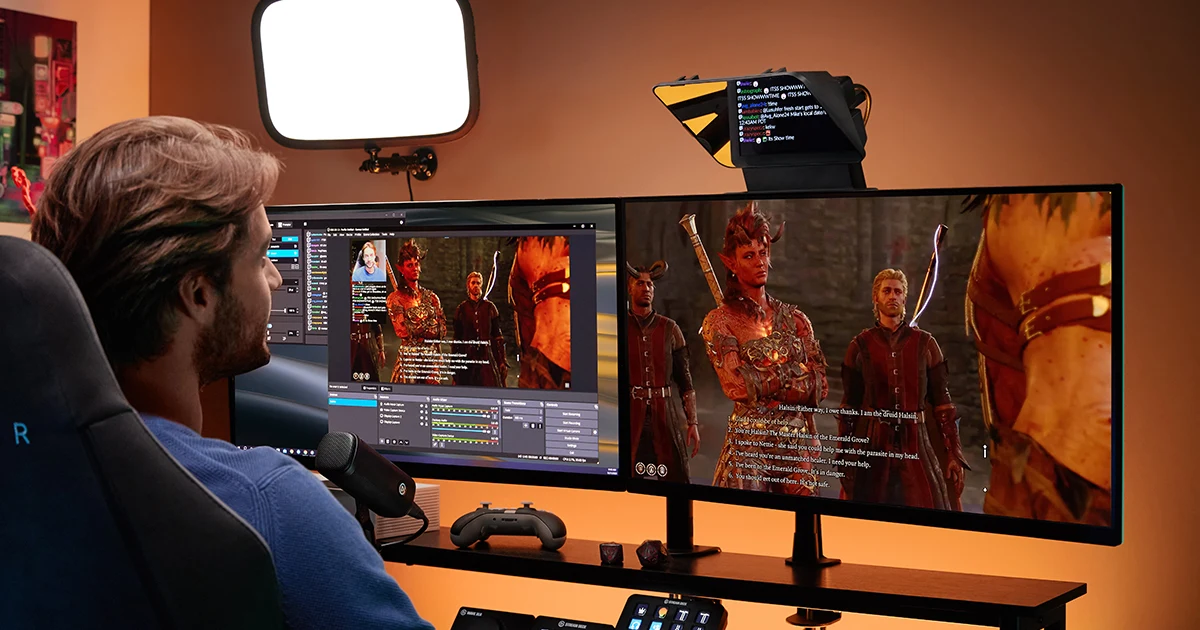

A teleprompter is useful when looking down at your script causes repeated takes or breaks eye contact. For a fixed creator desk, a model with its own display can make setup simpler. For occasional recordings, a phone-based rig or a few notes beside the lens may be enough. Choose around your actual recording position, not the promise that hardware will make every script sound natural.
A product to consider
Check the fit below, then select Buy on Amazon for the current offer and buying options. We may earn a commission from this paid link.
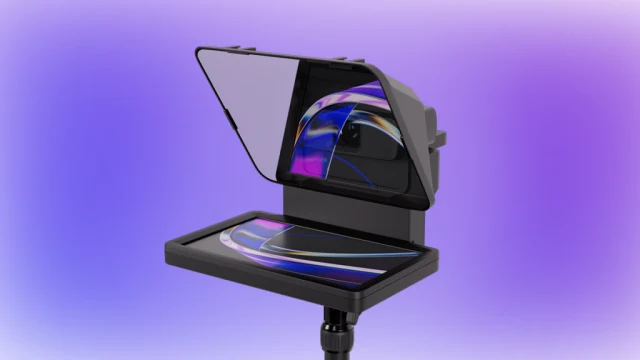
Elgato Prompter, 9-inch
For a regular desk-based recording setup
Consider the standard 9-inch model if you want a dedicated script display connected to a compatible computer. This is Prompter alone, not Prompter XL or a camera bundle. Check your camera, mounting support and software requirements before ordering.
Download the practical worksheet
Original blank CSV worksheet. Record your own setup and observations.
Start with the problem you want to fix
Record a short explanation before buying anything. If you forget key facts, a clearer outline may help. If you remember the content but repeatedly look away, bringing the words closer to the lens may help. If your delivery sounds stiff, a teleprompter can reproduce that stiffness perfectly. It does not rewrite a sentence into something you would actually say.
For an AI tutorial, separate the introduction from the screen demonstration. You might need a short scripted opening, then a checklist while showing the software. Reading every mouse movement from a scrolling paragraph can make the demonstration harder to follow. Use the smallest amount of prompting that keeps the explanation accurate.
A prompter also does not solve unstable framing. If you move around the room, compare the tracking webcam guide first. A stationary text display and a moving presenter can be a poor match. Plan where you will stand or sit before choosing equipment.
Built-in screen or a phone-based rig?
| Setup | Useful when | Check first |
|---|---|---|
| Built-in display | You record at the same desk regularly | Computer, software, USB and mounting compatibility |
| Phone or tablet behind glass | You already have a spare display device | Holder dimensions, app controls and remote compatibility |
| Notes beside the lens | You need only a short outline | Whether eye movement is distracting in the saved video |
A phone-based rig usually supplies the reflective glass and support, while your device supplies the words. Include that device in the total setup. If your only phone is also your recording camera, it cannot automatically occupy both positions. Confirm the rig's documented recording arrangement rather than assuming every phone holder solves this.
A built-in display removes the spare-screen requirement, but it may still depend on another computer. Elgato's standard Prompter uses a 9-inch, 1024 × 600 display and a USB connection for power and video. Its screen resolution describes the script display, not the resolution of the camera recording through the glass.
Where the Elgato Prompter makes sense
Our conditional pick is the standard Elgato Prompter for creators who record repeated introductions, lessons or presentations at a computer. The dedicated display is the main reason to consider it. You can keep a script in front of the lens while your main monitor remains available for recording controls.
Ian Stokes's May 2024 Digital Camera World review praised the display clarity and dedicated app. Those are his observations, not QuestStudio test results. The review predates later software changes, so use the current manufacturer documentation for features and system requirements.
Elgato now advertises Voice Sync, which follows spoken delivery. Its listed requirement is an NVIDIA RTX 2060 or newer, or Apple Silicon M1 or newer. That is a specific requirement for voice-following functionality. Do not assume a computer that can show the display can also run every optional feature. Keep a manual scrolling fallback for an important recording.
Skip this purchase if your recordings are infrequent and a short outline already works, or if you need a self-contained field setup with no compatible computer. A larger display is not automatically better at close range either: overly wide lines can create visible eye scanning.
Check camera fit before the package arrives
List the exact camera or webcam, lens, support and computer port. Compare them with Elgato's current specifications and compatibility resources. Check lens diameter, field of view, camera clearance and the supported mounting method. Similar camera names can conceal different dimensions.
Account for the complete weight on the mount, including the camera and any accessories. Use the support manufacturer's limits and assembly instructions. A product photo showing a tripod, light or camera does not establish that those accessories come in the selected box. The linked listing is the standard Prompter, not a full studio kit.
Place the lens at an appropriate eye level, then test reflections and framing with your actual lights. If the lens sees an edge of the assembly, changing the camera position or supported lens setup may be necessary. Do not assume editing will remove the obstruction cleanly. Our USB connection checklist helps document the computer side without guessing from connector shape.
Try this three-take script exercise
Use the downloadable worksheet on one 60-to-90-second explanation. The duration is a practice target, not a promise about viewer retention. Keep the same camera position and lighting so you can compare delivery instead of comparing production conditions.
- Take A, outline only: put three key points near the lens. Record without memorizing a paragraph.
- Take B, full script: read a conversational version from your available prompting setup. Mark each sentence that makes you rush or restart.
- Take C, revised script: shorten those sentences, add breathing spaces and move demonstration cues onto separate lines.
Watch the three files without looking at the script. Record factual omissions, visible eye movement, restarts and whether the result sounds like you. Do not invent a percentage improvement from a single session. The useful outcome is a repeatable choice: outline, full script or a mixture.
If you cannot borrow a prompter, the first take still helps establish whether prompting is your bottleneck. A no-purchase baseline prevents an accessory from becoming the answer to a problem you have not identified.
Connect the script to the finished video
Use a simple three-column plan: spoken line, real demonstration, supporting visual. Put a pause in the script where a clip or screenshot will appear. For an AI product explanation, keep actual interface behavior in genuine screen recordings. A generated illustration should not masquerade as evidence of a feature.
In QuestStudio Video Lab, create a short supporting visual from an appropriate brief or permitted reference. For example, a tutorial introduction could use a clearly illustrative establishing shot before returning to your real demonstration. This is a separate asset-creation step; Video Lab does not control the teleprompter.
Keep the approved script, presenter take and supporting clip in the same project folder with clear version names. Check the final export once with headphones, using the editing headphone checklist if you need an audio review method. Better prompting matters only if the finished explanation remains clear.
Frequently asked questions
Does a teleprompter record the video?
Usually no. It displays words near the lens; a separate camera or phone records the presenter. Check the exact product and bundle.
Does Elgato Prompter work without a computer?
The standard model uses a compatible Windows or Mac computer for its USB display and software workflow. A built-in screen does not make it a standalone recorder.
Do I need Voice Sync?
No. Start with a scrolling method you can control reliably. Voice Sync has additional hardware requirements and is an optional workflow choice.
Will it work with any camera lens?
Do not assume that. Check the exact lens dimensions, viewing angle, camera clearance and mounting arrangement against the current compatibility guidance.
Can AI write the entire script?
It can help with a draft, but verify every factual claim, rewrite it in your voice and rehearse it aloud before recording. A prompter cannot verify the words it displays.
Sources and further reading
Sources and exact product listings checked October 27, 2026. Images: credited manufacturer press material, not QuestStudio test photographs. Original decision framework and worksheet: QuestStudio.
Affiliate disclosure and research approach
As an Amazon Associate I earn from qualifying purchases. If you buy through paid links, QuestStudio may earn a commission at no extra cost to you. See our editorial and affiliate policy.
This is a research-based guide using linked manufacturer documentation and clearly attributed published reviews where available. We have not tested this equipment hands-on. The worksheets are original exercises for your observations, not published test results.