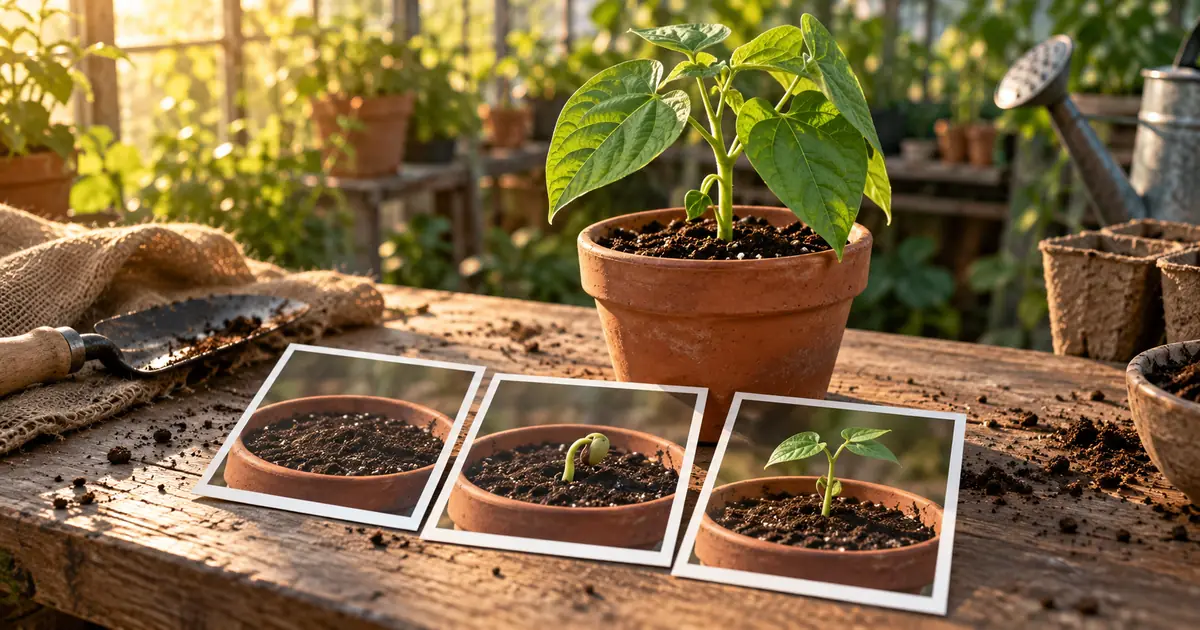

An AI plant growth timelapse works best when each clip has one clear change and the surroundings stay recognizable. Plan the stages first, approve a starting image, and inspect the end of each clip before using it to continue the sequence.
The result is an illustration of growth, not a recording of a plant developing over measured time. If your project needs evidence about germination speed, fertilizer results or a particular specimen, film the real process. Generated imagery can explain an idea, but it cannot establish what happened in an experiment.
Choose a short, visible transformation
Pick a scope you can describe without skipping several unrelated processes. “A small seedling opens its leaves” gives the viewer one action to follow. “Seed to mature tree with flowers and fruit in one continuous shot” demands many structural changes and creates more opportunities for the scene to transform unpredictably.
For a first project, work with a seedling already above the soil. You can concentrate on a connected stem, leaf positions and the container. A transparent soil cross-section may look compelling, but it adds roots, underground geometry and a representation that needs its own factual review.
If the video teaches a named species, collect reliable botanical references for the stages you intend to show. Do not use a generic leaf shape and label it as a specific plant. Avoid day counters unless they come from an actual observation or a clearly supported example.
Create a stage sheet before generating motion
Write down what changes and what remains fixed. The following original plan illustrates leaf expansion rather than a full lifecycle:
| Stage | Visible change | Things that remain fixed | Review question |
|---|---|---|---|
| A | Seedling stands with leaves partly closed | Pot, soil line, camera and stem base | Is the starting structure clear? |
| B | The same leaves begin opening | Leaf attachment points and container | Did a leaf appear from nowhere? |
| C | Leaves finish opening and settle | Stem connection and scene lighting | Does the final plant belong to stage A? |
The stage labels describe editorial beats, not biological durations. Decide how much screen time each needs after reviewing the generated clips. If stage B is unreadable at the intended pace, hold it longer instead of adding more stages.
Download the plant continuity worksheet and replace the example with your own subject. Include the reference image filename so the next revision starts from the same plant.
Lock the camera and the container
A fixed frame makes small growth changes easier to understand. Choose a viewpoint that leaves room above and beside the plant. If the first image is tightly cropped around closed leaves, the expanding plant may leave the frame.
Use a simple background with no passing people, moving curtains or distracting reflections. Keep the rim of the pot visible as an anchor. The soil line provides another useful reference: if it rises and falls independently of the action, the scene may feel as though the whole object is melting.
Approve the still before animating it. Check that the stem is attached, the pot is structurally coherent and the leaf arrangement is suitable for your intended illustration. Motion generation should not be your first attempt to repair a confusing starting image.
Ask for one change at a time
Give the video model a restrained action and clear continuity goals. Use image-to-video when the selected model supports it, with the approved frame as the starting reference.
This prompt is an original planning example. It does not guarantee that a model will preserve every feature. Review the clip at normal speed and then inspect the moments where the leaves cross or uncover each other.
Avoid packing several camera moves into the same request. A zoom, orbit and growth transformation can make it difficult to tell whether a leaf changed or merely moved out of sight. Establish a stable version before experimenting with a more elaborate presentation.
Find the first continuity failure
Do not judge a plant clip from its best frame. Watch the stem base, leaf attachments and container throughout the motion. Mark the earliest point where one of those changes incorrectly.
A leaf may briefly duplicate, disappear behind another leaf and return with a different shape, or slide along the stem. The final image can look plausible while the transition is visibly broken. The AI video consistency guide explains why frame-to-frame review matters beyond the starting still.
Choose a repair that matches the failure. If the pot drifts, simplify the background and camera instruction. If several leaves cross and merge, reduce the amount of movement or use a clearer viewing angle. If the biological sequence is wrong, revise the stage plan rather than adding stronger realism adjectives.
Continue from an approved frame
When a clip ends cleanly, save a suitable ending frame for the next stage if your workflow supports reference continuation. Compare it with the original plan before reusing it. A tiny error carried into the next clip can become a larger structural change.
If the ending frame is compromised, choose an earlier clean point or regenerate that stage. Do not treat continuation as an obligation to accept whatever the first clip produced. Sometimes a clean editorial cut between two approved views is more convincing than a forced continuous transformation.
Keep the container, background and framing consistent across stages. Record any deliberate changes. If the lighting shifts from cool morning light to warm evening light, decide whether that change serves the illustration and make it coherent across the edit.
Assemble the sequence with visible breathing room
Place the clips in an external video editor. Trim duplicated holds and compare the frames on each side of every cut. Avoid dissolves that create two overlapping stems or pots for several frames. A dissolve can soften a transition while making a structural mismatch more obvious.
Leave a short opening view so viewers understand the starting state, and a final hold so they can see the result. Review without music first. Audio can make an edit feel finished before the visual sequence actually works.
If narration explains the stages, keep it aligned with what is visible. Do not describe roots developing in a shot that never shows them. The storyboard-to-animatic workflow can help test that timing before generating a longer sequence.
How QuestStudio helps
Use Video Lab to explore a short motion stage with the inputs and duration options supported by the selected model. Use Image Lab when you need a clear illustrative starting frame.
Keep stage approval outside the prompt itself: the saved frame, accepted clip and worksheet should agree. Final assembly, labels and export checks belong in your editing workflow. Label the result as an AI-generated illustration when presenting it in a context where viewers could mistake it for observed footage.
Frequently asked questions
Can AI make a scientifically accurate plant timelapse?
A plausible result is not automatically a verified biological sequence. Review species and stages against reliable references, and use real footage when timing or experimental evidence matters.
Why does the pot change during the video?
The model may reinterpret the whole scene while generating motion. Use a clear reference, a stable viewpoint and a simpler action, then inspect the container throughout the clip.
Should I generate the whole lifecycle in one clip?
Start with a narrow transformation. A full lifecycle introduces many structural changes that are harder to control and review in one pass.
Can I use the last frame to extend the video?
When your selected tool supports reference-based continuation, an approved ending frame can help. Reject or repair a flawed ending before carrying it into another stage.
How do I hide a bad join between growth clips?
First check whether the two plant states actually connect. Trim to compatible frames or regenerate the failed stage. A transition effect cannot reliably repair contradictory plant structure.
Build the sequence from accepted stages
Keep the plant's structure understandable and let each clip do one job. A short, connected illustration is more useful than a long transformation that changes the specimen halfway through.
Animate one approved stage in Video Lab
Hero image: AI-generated editorial illustration. Examples are original planning exercises, not measured model tests.
Continue with a useful next step
 Video
VideoAI Renovation Timelapse: Show Progress Without Inventing the Room
Plan a fictional renovation timelapse with stable room geometry, an ordered state ledger, and clear boundaries between real records and generated transitions.
 Video
VideoHow to Make an AI Book Trailer: A 30-Second Story Plan
Make an AI book trailer with an original 30-second beat sheet, a spoiler budget, narration timing, reusable visual references, and a readable final card.
 Video
VideoAI Cooking Video From Photos: Build a Clear Recipe Reel
Turn your food photos into a recipe reel using a shot-to-recipe map, controlled motion, honest process labels, and checks for ingredient continuity.