
Perchance AI is our pick for a quick short-story draft without an account. Choose Sudowrite for planning and drafting chapters, NovelAI for continuing fiction with recurring lore, Flipped AI for character dialogue, or AI Dungeon for a playable adventure. Use QuestStudio when your next step is to turn a scene into images or video.
Try the short story prompt or make your first storyboard frame.
The 10 best AI story generator sites by use case
Each link goes to the site or its story tool. Choose the tool that gets you to the next thing you want to make. These editorial picks are based on documented features reviewed November 25, 2026. The original example below shows how one premise plays out across writing, roleplay, and visual production.
| Site | Best for | First result to look for |
|---|---|---|
| 1. Perchance AI | Quick short drafts | A scene you can finish and revise in one sitting. |
| 2. Rabu AI | Guided short fiction | A draft shaped by the genre, length, and audience you pick. |
| 3. Type.ai | Going from an idea to an opening | An outline and opening you can continue in the editor. |
| 4. ChatGPT | Drafting and revising in conversation | Two takes on a scene using the same premise. |
| 5. Sudowrite | Drafting chapters from a plan | A chapter based on your outline and scene notes. |
| 6. NovelAI | Continuing fiction with recurring lore | A new passage informed by an activated Lorebook entry. |
| 7. Novelcrafter | Organizing a world or series | A scene that draws on your Codex and outline. |
| 8. Flipped AI | In-character roleplay | An exchange that reveals how a character reacts under pressure. |
| 9. AI Dungeon | Playable stories | Two different outcomes from two different player choices. |
| 10. QuestStudio | Illustrating and animating a scene | A reference frame you can reuse for the next shot. |
1. Perchance AI for a quick first draft
Try the same premise with two different decisions at the end. A bicycle courier who boards a train to recover a lost year will make a different story from one who goes back upstairs to finish her delivery. Pick the decision you want to follow and edit the earlier paragraphs so it feels earned. The extended community generator is free to start without signing up. Perchance AI Story Generator Extended.
Compare Perchance AI story generator alternatives if you need a longer draft, recurring story details, or illustrations.
2. Rabu AI for guided story inputs
Use Rabu when you'd rather pick the genre, audience, and length before writing. Try the same premise once for a younger reader and once as an adult mystery. Read the openings and check whether the language and amount of explanation suit each audience. The public generator says you can start without an account. Rabu AI Story Generator.
3. Type.ai for planning an opening
Type.ai's generator describes an outline with characters and plot events, followed by a preview of the opening. Use that preview to check whether your idea has a clear turn. For the courier story below, look for an opening that makes the delivery matter before the train offers Mina another choice. Type.ai story generator.
4. ChatGPT for revising a scene through conversation
ChatGPT has a dedicated story generator page you can start from with a few details. Its chat format is useful when you want to revise one aspect of a draft. Ask for two versions that preserve the same facts, with one foreshadowing the train through sound and one through something Mina sees. Keep the version that plants the clue without spoiling it. ChatGPT story generator.
5. Sudowrite for drafting a novel chapter by chapter
Sudowrite's Story Bible stores characters and worldbuilding, and its Draft tool uses an outline and scene notes to generate prose. Try it when you've decided what a chapter needs to accomplish but still need a version you can edit. For Mina's story, give the chapter two scene notes: she has a delivery to finish, and the train offers a reason to leave it behind. Sudowrite Story Bible documentation.
6. NovelAI for continuing fiction with established lore
NovelAI continues the prose you write. Its Lorebook lets you attach details about a recurring place or object to activation keys. For a series about Mina, give the brass token one rule, such as a single ride per token, and check whether continuations follow it when the token appears again. NovelAI Lorebook documentation.
7. Novelcrafter for keeping a series consistent
Novelcrafter's Codex keeps entries for characters, locations, objects, and subplots. Its planning views help you see where those entries appear across scenes. Use it when later chapters or books need a shared record of who learned a secret and when. For AI generation, connect an external provider or a local model. Novelcrafter Codex · AI setup.
8. Flipped AI for testing a character's voice
Flipped.Chat supports chats with existing or custom characters. Try asking a station attendant who sent the train. Give the attendant one thing they want and one detail they would rather conceal. Keep a reply you can use to sharpen their voice in your own scene. Flipped describes its app as intended for adults. Flipped.Chat FAQ · Flipped age policy.
See the Flipped AI alternatives for character storytelling for a scene test you can use across tools.
9. AI Dungeon for playable adventures
AI Dungeon advances an adventure as you choose what your character does or says. Try taking the train in one playthrough and returning to the delivery in another. Check whether the outcome changes in a way you can trace back to each choice. Optional Story Cards can add recurring setting or character facts. AI Dungeon play guide · AI Dungeon Story Cards.
10. QuestStudio for storyboards and short videos
Bring a scene you've drafted or improvised into Image Lab. Build the one frame that needs to communicate the change in the story, then reuse that frame as a reference for later shots or a starting image in Video Lab. The booth example below gives you a scene and a prompt you can open directly.
Where Nuance Labs AI fits
Nuance Labs offers a research preview for live audiovisual conversation with the Emma and Nora personas. That is useful to explore when your audience will talk back to a character. See what Nuance Labs AI does and how it compares with scripted voiceover. Nuance Labs research preview.
Try an AI story generator with this short prompt
Start with a character, an immediate goal, and a choice that will cost them something. The example below uses an object the reader can picture and a small enough cast to keep the scene focused. Paste it into your preferred writing tool or swap the courier, the location, and the choice for your own.
Write a 300-word mystery called The Last Transfer. Mina, a bicycle courier in a yellow raincoat, takes shelter at a closed subway station. An empty ticket booth dispenses a brass token. A train arrives and opens one door. Mina can board to find the person who sent the token, or go back upstairs to finish the delivery she promised to make. Keep the point of view close to Mina, use the rain and station sounds to build tension, and end on the first visible consequence of her choice. Then list three moments someone could draw.Read the draft once and mark the sentence in which Mina decides. If the choice feels arbitrary, revise a detail before the train arrives. A glance at the rain-soaked delivery label can remind the reader what she'd be giving up. If the ending explains who sent the token, try ending at the door first and see how much of the mystery the scene can carry on its own.
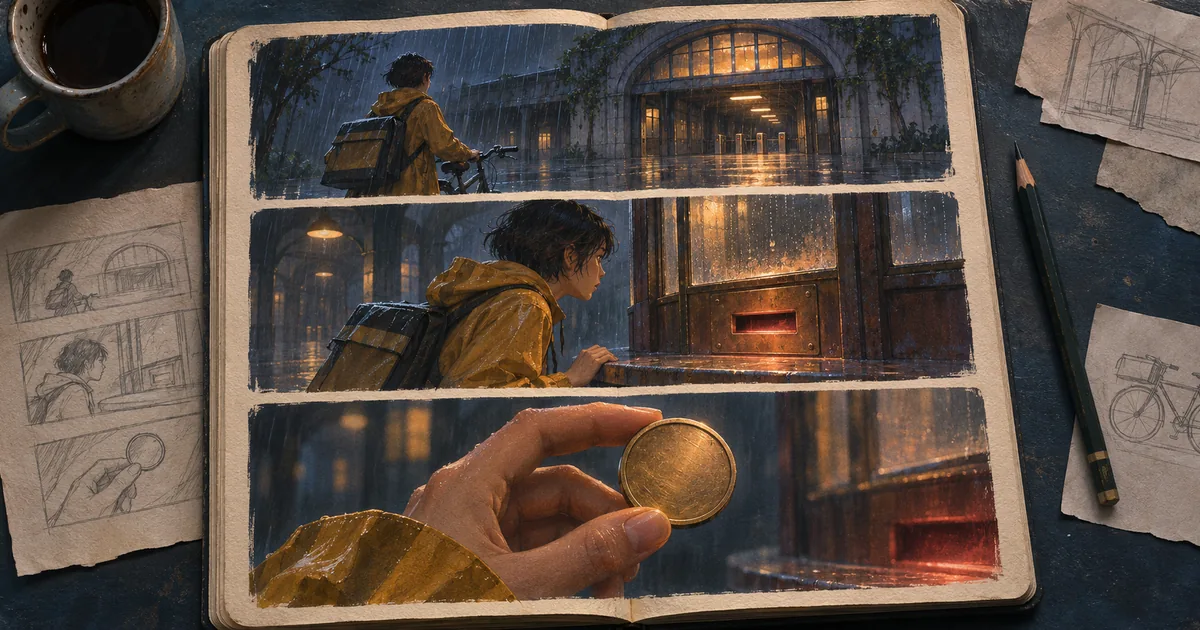
Turn the draft into three shots
- Establish the place. Show Mina next to her bicycle at the station entrance. The rain and shuttered stairs tell us why she's looking for shelter.
- Show what changes. Move to a medium shot at the empty booth as the ticket slot lights up. Keep the yellow raincoat and delivery bag visible so the connection to the first frame is immediate.
- Make the choice visible. Show Mina leaving the delivery bag on the platform as the train doors close. A viewer can see what she chose and what she left behind.
Put three stills in order and show them to someone without the story text. Ask what changed between frames two and three. If they can describe the token but miss the choice, give the delivery bag a more prominent position in the final shot.
Make the first storyboard frame in QuestStudio
Start with the booth shot. It contains the character, location, and prop you'll need to carry through the storyboard. Preview QuestStudio Image Lab or use the image prompt below to open it with the scene filled in.
Landscape 16:9 storyboard still. Medium shot of Mina, a short-haired bicycle courier in a mustard-yellow raincoat with a charcoal canvas delivery bag. She stands in profile at a shuttered subway ticket booth after dark, looking down at a brass token just emerging from a red-lit ticket slot. Rain beads on her sleeves. Cool blue station lighting, warm red light on the token, simple composition with the courier and slot clearly visible. No legible signs or logos.- Make one frame and check it. Confirm Mina's gaze lands on the token and that the booth slot reads clearly at thumbnail size. If the frame is too busy, simplify the background before refining small details.
- Reuse your chosen frame. Use it as an image reference with a model that supports reference inputs. Keep Mina's coat, hair, and bag consistent as you change the framing. Give each shot its own action.
- Test one motion beat. Use Video Lab when you have a still you want to animate. Start with a single movement, such as the token sliding out. Once you have a few stills, use this storyboard-to-animatic workflow to check timing before animating more shots.
Start with a scene you already want to see. Create a QuestStudio account, open Image Lab, and make one frame you can build the rest of your story around.
Create a QuestStudio accountAI story generator FAQ
Can I use an AI story generator without signing up?
Yes. The Perchance AI Story Generator Extended lets you start a written story without creating an account. You can try the story prompt above with your own character and setting.
Is Flipped AI a good Perchance alternative?
Flipped AI fits stories you want to improvise through character dialogue. Perchance fits a short written draft you can read and revise as a whole.
Is Nuance Labs AI a story generator?
Nuance Labs focuses on real-time audiovisual conversation. A prose generator or fiction-writing app is a closer fit for drafting a short story or chapter.
What should I give an AI story generator?
Include the character, their immediate goal, the obstacle, the point of view, and the choice that ends the scene. Specify a length so you get a draft you can read and edit in one sitting.
Can QuestStudio turn a story into a video?
You can use Image Lab to make scene images and Video Lab to animate selected frames. Plan and review the shots individually, then assemble them in the order that tells the story.