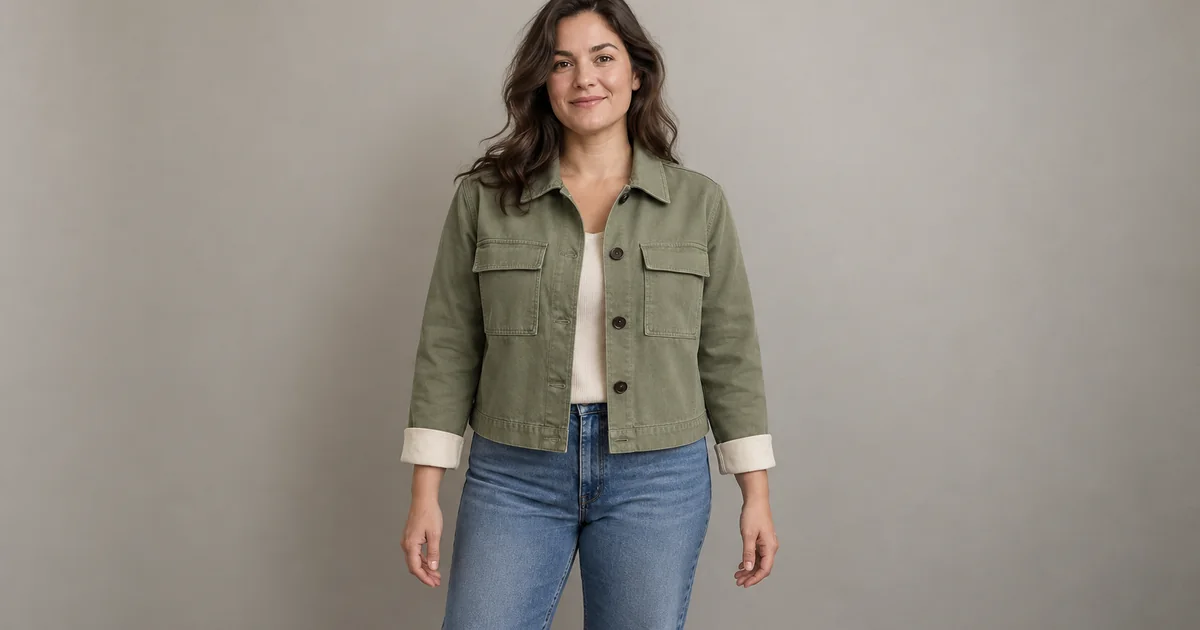

A jacket can look excellent on the model and still be the wrong jacket. The pockets move, the hem rises, and the body underneath quietly changes shape. A useful try-on review treats the person and the garment as two separate things to protect.
Download the garment truth sheet · Explore a clothing concept
Editorial guide checked September 13, 2026. Examples and worksheets are original planning material; the hero is an AI-generated illustration, not a model benchmark.
Decide whether you are judging style or selling an item
A personal styling experiment asks whether a color or silhouette appeals to you. A product image asks whether a specific garment is represented accurately. The second job has a stricter standard. An attractive invented pocket is harmless in a concept sketch but misleading in a listing for a jacket that has no such pocket.
The Google Try-On help page explicitly separates its generated visual from a guarantee of actual fit. That distinction should survive your entire workflow. The preview can help you explore appearance; it cannot tell you how fabric feels, whether a sleeve restricts movement, or which size is right from the image alone.
Our example is a sage utility jacket with two rectangular chest pockets, four dark front buttons, cream turned cuffs, and a short straight hem. These details form an original review assignment. The illustrative hero is not a photograph of a real product or evidence that a try-on system preserved one.
Build a garment truth sheet from the real source
Before uploading anything, write down the features that identify the item. Use an actual product photo or supplied garment documentation. If the back is not visible, mark it unknown instead of filling the gap from memory. The review sheet should distinguish observed facts from assumptions.
| Feature | Example reference fact | What can go wrong |
|---|---|---|
| Pockets | Two rectangular chest pockets | A pocket disappears or becomes decorative trim |
| Closure | Four dark front buttons | Buttons multiply or turn into a zipper |
| Sleeves | Cream turned cuffs | The cuff changes color or construction |
| Hem | Short and straight | The jacket becomes longer or curved |
| Back | Not shown in the source | An invented seam is mistaken for a verified detail |
Keep the sheet short enough to use. The goal is not to catalog every wrinkle. Prioritize construction, recognizable design features, pattern scale, and the boundaries that affect the product’s identity. A fold can vary with pose; the number of pockets should not.
For patterned clothing, record which marks cross seams and how large they are relative to the garment. A generated plaid can look convincing while losing the original repeat. When that pattern is part of what the customer is buying, visual plausibility is an insufficient standard.
Choose a person photo that leaves room for the garment
Use a clear image with even lighting, visible body boundaries, and arms positioned so the torso is readable. A hand across the chest hides the closure. A large bag over the shoulder hides the sleeve and pocket. Those can be good fashion poses later, but they are weak first tests for garment fidelity.
Google’s published photo guidance recommends good lighting, an unobstructed view, and fitted clothing rather than overly baggy outfits. Follow the requirements of the specific tool you use. Different garment categories and interfaces may accept different source crops or reference arrangements.
Keep the person’s source image unchanged for the first garment comparison. If the lighting, body pose, and camera distance all change between candidates, you cannot tell whether an apparent improvement came from the clothing transformation or a more flattering photograph.
Use your own image or a person’s image with permission for this purpose. For a fictional model, label the resulting asset appropriately for its use. The important production question is whether everyone reviewing the work understands what is generated and what is a source fact.
Review the garment before the overall attractiveness
Make one pass that ignores the face and background. Look only at the jacket against the truth sheet. Count the visible closures, check pocket placement, and follow the hem. If an essential feature is hidden, mark it unverified rather than awarding a pass because the rest looks good.
Now look at the cloth behavior. Does a sleeve fold connect sensibly to the arm? Does the jacket stop at the correct boundary, or blend into the trousers? Are buttons attached to the cloth rather than floating over it? A useful styling image should still have coherent local construction.
Separate color shifts caused by light from changes in the garment itself. Compare under the same viewing conditions and avoid claiming exact color matching from a generated scene. If color accuracy is commercially essential, preserve verified product photography for the final decision.
Check whether the person was quietly redesigned
After the garment pass, compare the person’s shoulders, waist, hips, arm length, and overall stance with the original. You are not rating the body. You are checking whether the system changed it while supposedly changing the clothes.
A narrower waist can make a jacket appear more fitted without showing anything about how the actual item would behave. A longer torso can make the hem appear shorter. These changes affect the interpretation of the clothing even when the face remains recognizable.
Use a simple outcome record: preserved, changed, or obscured. Add a note for any difference that matters. Do not combine everything into an “accuracy percentage” unless you have defined the measure, reference, and test sample. A plausible number does not make a visual judgment more rigorous.
Use a second pose as a stress test
Once the straight-on preview passes, try one modest pose change with the same garment. A quarter turn can reveal the side seam and sleeve relationship. Avoid jumping immediately to crossed arms or a dramatic seated pose, where several important areas become hidden.
The second view tests stability rather than proving the first view was physically accurate. If the pocket count changes or the cuff disappears, the garment representation is unstable. If the newly visible back was never supplied, treat its details as inferred even when they look consistent.
For a real product campaign, compare the generated concept with a real photo of the garment on a person when possible. That gives the reviewer evidence about actual drape and construction. It is a different kind of reference from another generated image agreeing with the first one.
Choose a repair, a new source, or a different deliverable
If the jacket changes identity, improve the product reference or simplify the pose before trying more descriptive language. If the body changes, return to the original person photo and check the tool’s input guidance. If critical details remain unverified, use the result as a styling concept instead of a product-fact image.
Keep a clear stop rule: the image must preserve the required visible features and must not imply a fit decision it cannot support. When repeated attempts fail, retaining the real garment photography may be the correct outcome. More generations do not turn an uncertain representation into evidence.
Use QuestStudio for concept work with an honest boundary
Image Lab can help explore a clothing direction or a fashion composition using supported image workflows. A dedicated virtual fitting room or garment-sizing simulation is not currently listed. Do not describe a general image edit as a measured try-on.
Download the garment truth sheet before generating the concept. Keep it with the original references, the selected image, and any unresolved details. That makes the next action useful: a designer can approve a visual direction, a photographer can plan a real shoot, or a shopper can return to actual measurements with a clearer idea of the look they want.
Frequently asked questions
Can an AI try-on image tell me which size to buy?
The image alone cannot determine physical fit. Use the retailer’s actual measurements and sizing information for that decision.
What should I check first in a clothing preview?
Check whether the garment is still the same item: pocket placement, closure, sleeve length, hem, pattern and trim. Then check the person’s proportions.
Why does the jacket look different after a pose change?
A new pose reveals surfaces the source may not show and changes occlusion. The system can infer those areas incorrectly.
Does QuestStudio have a dedicated virtual fitting room?
A dedicated garment-sizing or virtual fitting-room mode is not currently listed. Image Lab is useful for creative clothing concepts that still need source-based review.
When the garment and fit should stay exactly as photographed, follow the AI clothing recolor workflow to change one shade while reviewing fabric, seams, trims and skin spill.