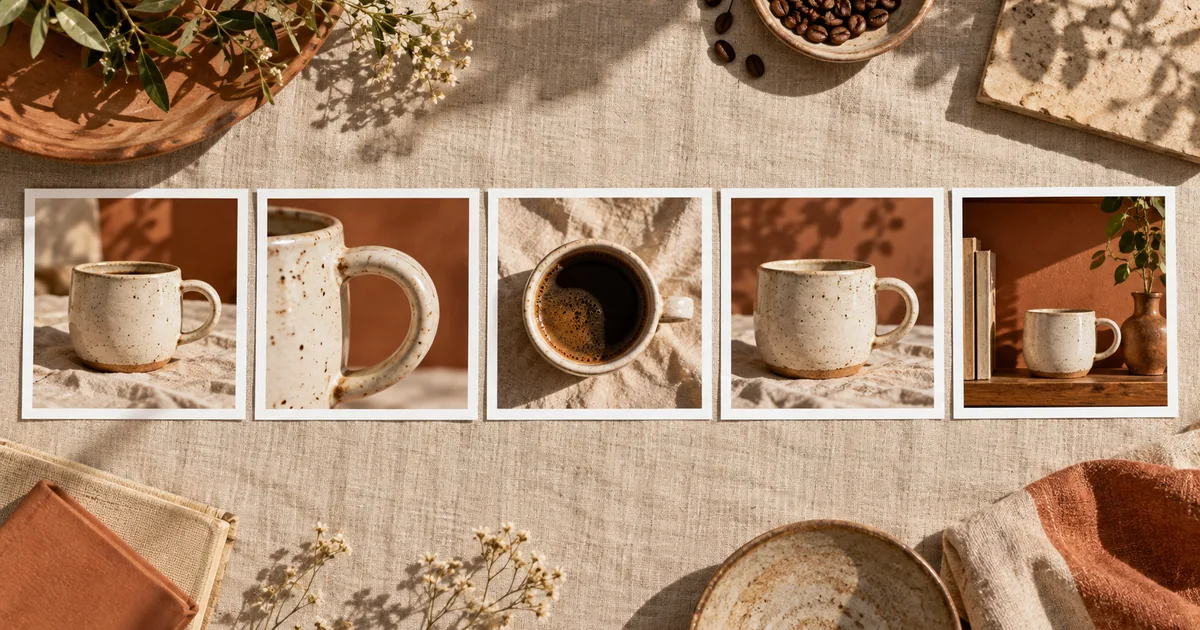

The first image looks excellent. The second has different light, the third changes the product, and the fourth belongs to another brand entirely. Consistent AI carousel images need a shared visual brief and a reason for each slide to exist. Repeating the same adjectives is only part of that work.
Download the five-slide consistency matrix · Build the first carousel image in Image Lab
Start with the point of the carousel
A five-slide carousel should communicate one idea in stages. For this example, imagine a small ceramic studio explaining the design of a handmade coffee cup. The sequence moves from the whole object to the handle, the rim, its everyday setting, and a final invitation to inspect the product. Each image answers a different question.
Write the intended message of every slide in plain language before choosing a model. “Close-up” is a camera instruction, not a message. “Show the comfortable handle opening” gives you a reason for that close-up and a feature you must preserve.
Keep factual copy separate from generated photography. If you plan to say the cup is dishwasher-safe, that claim needs product evidence. A convincing image of a dishwasher cannot supply it. Add text with a layout tool after approving the images so spelling and hierarchy remain easy to revise.
Separate fixed details from allowed changes
The fixed column describes what must remain recognizable across the set. The variable column gives each slide enough freedom to be useful. If everything is fixed, the images become redundant. If everything varies, the carousel looks like unrelated stock photography.
| Keep fixed | Allow to change | Reject |
|---|---|---|
| Actual cup shape, glaze and handle | Crop and approved source angle | New handle geometry or invented finish |
| Cream, linen and terracotta palette | Relative amount of each color | One slide with unrelated neon colors |
| Soft light from the upper left | Subject distance and depth of field | A hard right-side shadow without a reason |
| Quiet, tactile photographic style | Whole view versus detail | A sudden switch to illustration |
| Reserved space for later copy | Exact image arrangement | Generated lettering inside the photograph |
Use a real reference for a real product. A beautiful generated cup is appropriate for a fictional exercise, but it should not become the authority for a handmade item you actually sell. If an angle is unavailable, photograph it or choose a different slide job.
Build one approved reference image
Create or select a frame that clearly establishes the subject, palette and lighting. Avoid choosing an image whose appeal depends on an unusual angle that hides half the product. The reference should make the repeatable decisions easy to see.
Save a short visual brief next to it: warm neutral surface, soft left light, restrained contrast, real glaze texture, no decorative lettering. Record model and settings when available. These notes help diagnose drift, but using the same seed or model does not guarantee the same result across substantially different prompts.
Adobe's reference-image documentation illustrates how reference controls depend on the chosen workflow and model. Check what your own editor accepts. A text mention of “the previous slide” cannot replace a reference image in a workflow that has no access to it.
Plan the five frames before rendering
| Slide | Reader's question | Image job | Approval detail |
|---|---|---|---|
| 1 | What is this? | Clear three-quarter cup portrait | Whole shape and handle readable |
| 2 | What makes the handle different? | Real handle detail | Opening and attachment points match |
| 3 | What is the finish like? | Rim and glaze close-up | Texture remains faithful |
| 4 | How does it sit in a room? | Cup in a restrained everyday scene | Scale and ground contact plausible |
| 5 | What should I do next? | Clean product view with copy space | Same item, quiet final composition |
This sequence creates variation through information, not random style changes. It also avoids five nearly identical hero images. If the product has no meaningful handle story, replace that slide with a detail that genuinely helps the reader instead of inventing a benefit.
Choose one canvas shape for the set before starting. A square canvas is a simple working example, but use the shape your destination accepts and preview it there. Do not rely on a universal social-media safe zone; overlays and crops can differ by placement.
Generate with a fixed brief and a slide-specific addition
Change only the image job for each frame. For the rim slide, use a suitable real reference of the rim rather than requesting a hidden view from a front photograph. For the room slide, keep props modest so a new plant or book does not become the subject.
When a model supports multiple references, label their roles explicitly: product identity, lighting style, or composition. If the controls do not separate those roles, test carefully. A style reference can accidentally donate its object shape or background to the result.
Review the strip, then inspect the details
Place all five images side by side at the same displayed height. First ask whether they belong together. Look for one overly saturated frame, a changed shadow direction, an unusually wide lens, or a cup that changes size relative to familiar props.
Then inspect each product against its source. A consistent set can be consistently wrong. Finally review the sequence on a phone, swiping in order. Does each slide add information? Is the detail large enough to understand? Does the transition from wide view to close-up feel intentional?
Add copy and page numbers only after the visual set passes. Keep headings readable, avoid covering the feature the slide explains, and check the final export rather than only the editable design. A caption can supply context that an image cannot, including what was generated or edited.
Rescue one drifting frame
If slide three changes the cup's color, return to the approved product source and repeat the same fixed brief. Do not adopt slide three as the new reference for slides four and five. That turns a local error into a new style direction.
If the only issue is a slightly different crop, a conventional crop may solve it without regeneration. If the product structure changed, cropping is not a repair. Replace the frame or select another verified angle. If the lighting is wrong, simplify competing style instructions before adding more adjectives.
Keep a rejected version only when its failure note is useful. “Rim became thicker” helps the next attempt. “Looks off” does not. Stop when the set communicates clearly and the product checks pass; endless aesthetic variations can weaken the editorial sequence.
How QuestStudio helps
Use Image Lab to create and compare reference-based images with an appropriate model. Store the fixed brief in your prompt workflow and keep the source reference unchanged while testing slide-specific additions. Assemble text, page order and final exports in your layout editor. QuestStudio does not need to auto-publish a carousel for this process to be useful.
Frequently asked questions
Can I generate all slides in one image?
You can explore a contact sheet, but individual output files usually make revisions and crop checks easier. Review each frame independently before assembly.
Will the same seed keep every image consistent?
It may help within some workflows, but it does not guarantee identical subjects or lighting when prompts and compositions change. Use references and visual review.
Should every slide use the same composition?
No. Keep the visual language consistent while varying the view according to the information each slide needs to communicate.
Can I add text during image generation?
You can, but separate text layers are easier to proofread, align and update. Add final copy after the visual sequence is approved.
What if only one slide looks wrong?
Return to the original approved reference and repair that frame. Do not let the failed frame become the reference for the rest of the series.
Approve a sequence, not five isolated pictures
Write the five slide jobs, finish the reference, and build the set against the same fixed brief. Start the first image in Image Lab, then judge the result as a sequence on the screen where it will be viewed.
The worked example is a proposed creative exercise, not a measured model benchmark. The hero is an original AI-generated editorial illustration.