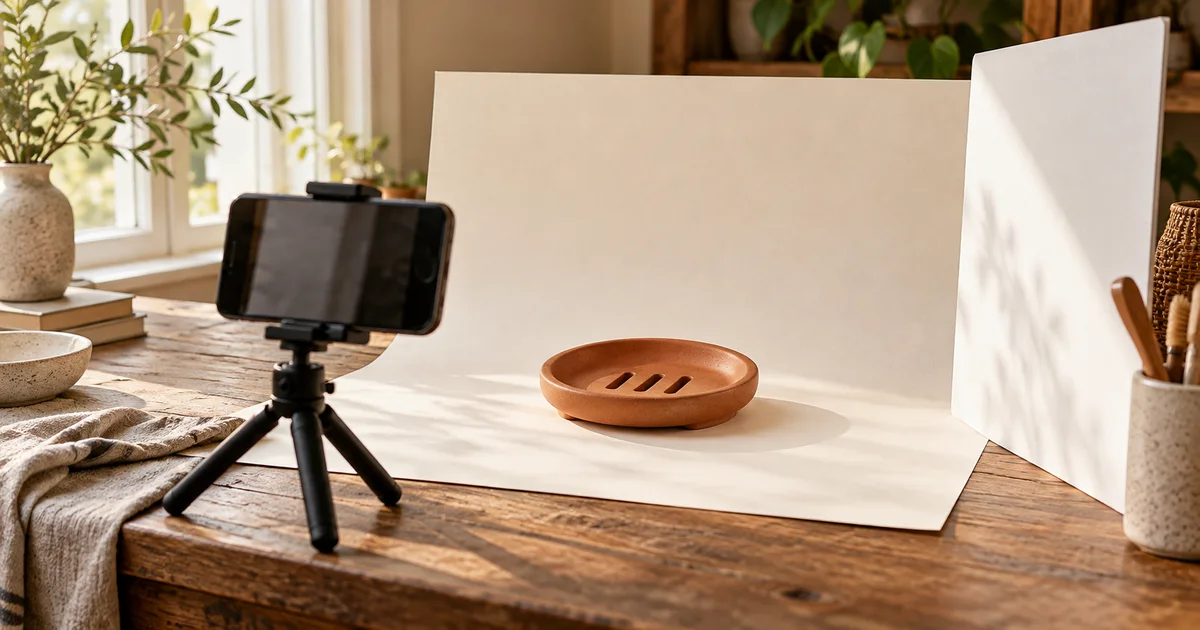

To take product photos for Etsy, start with the real item, soft light, a steady phone and a simple background. Capture the whole product, its important details, its size and what comes in the order. Then check the first image as a small thumbnail before arranging the rest of the gallery.
You can do this without building a studio. The useful starting point is one complete listing that you can reproduce next week. This walkthrough uses a fictional terracotta soap dish to show how to plan the shoot, keep the original photograph, choose useful views and export a coherent set. The diagrams and sample worksheet are planning examples, not photographs from a real seller.
Download the shot and export worksheet
1. Write down exactly what the buyer receives
For our example, the order contains one oval terracotta dish with three drainage slots. The soap, towel and countertop are styling props. The underside matters because shoppers need to understand how the dish sits on a surface. A close view of the glaze answers a different question from a wide bathroom scene.
Before photographing your item, write its variant, quantity, included pieces and important visible details on a card. Keep that card beside the setup. If you sell one-of-a-kind goods, photograph the actual piece and show its condition. If options change the appearance, capture the actual options instead of recoloring one photograph and treating it as evidence.
Choose the question each image must answer. If two frames only say “here is the front,” keep the clearer one. Our broader product photography shot list helps plan complicated bundles; the set below is deliberately for one simple item.
2. Set up a small, repeatable phone shoot
Place the dish on a clean matte surface near a window with indirect light. Turn off room lights that introduce a different color. If sunlight produces a hard bright patch, move the setup out of that patch or diffuse the window. Put a white card opposite the window and move it closer until you can see the shadow-side detail without making the product look flat.
Use a clean paper sweep if the line between the table and wall distracts from the object. Curve the paper gently behind the item. For the soap dish, an ivory background gives the terracotta edge room to show. Photograph a test before adding any props. A cream towel should not become the brightest, largest object in the frame.
Clean the phone lens. Support the phone on a tripod or another stable holder, then use its timer to avoid moving it as the shutter fires. Start with the main camera and step back enough that the nearest edge does not appear exaggerated. Compare another available optical lens if your phone has one; avoid assuming every phone's “2x” setting uses a separate lens.
Tap the product to focus and inspect the actual file. The dish's front rim and drainage slots should both be readable. Turn off simulated portrait blur if it cuts into the rim or blurs the slots. If a close detail will not focus, move back, refocus and crop a separate copy only if enough resolution remains.
Mark the phone and product positions with removable tape. Record the time, light direction and card position. These small notes make the next item easier to match. Etsy's official shooting guide is a useful reference for preparing the space and testing light before photographing a batch.
3. Photograph a gallery with six different jobs
Take the factual views before changing the set for a lifestyle image. Keep one clear original capture available as you move through the shoot. The six roles below are a starting plan, not a platform slot requirement or a promise that six photos increase sales.
| Role | Capture | Reject when |
|---|---|---|
| First image | Whole dish, front three-quarter view, no soap | Rim is clipped or slots disappear |
| Construction | Actual underside and feet | Shadow hides how it rests |
| Material | Close view of glaze and slot edges | Sharpening invents grain or halos |
| Size | Dish beside a readable ruler | Perspective makes the measurement ambiguous |
| Use | Real dish on a sink ledge with one soap bar | Props imply an included bundle |
| Arrival | Dish and the actual standard packaging | Gift wrapping appears but is not included |
For the size image, keep the ruler in the same plane as the dimension you are showing. Include the verified dimensions in the listing text as well. A hand-held image helps someone imagine the item, but hands differ in size; it should not carry the entire measurement explanation.
For the underside, turn the real dish over. Asking an image model to invent that view can create different feet or extra openings. Take a new photograph whenever the missing information is part of what the customer is buying.
4. Keep an original photo and edit separate copies
Save your untouched captures in an originals folder and make a separate exports folder. In the worksheet, the first sample record points to an original file; later rows identify edited copies. This is a file-management example, not evidence that any particular listing has been approved by Etsy.
As checked on October 25, 2026, Etsy requires at least one unedited photo of the actual item against a real background, with category-dependent exceptions. Its guidance allows editing other images, including AI-assisted changes, but says images must reflect what buyers receive and must not conceal damage or change the item's appearance. Check the current Etsy image requirements and linked exceptions for your item type. Etsy also recommends noting AI edits in the listing description.
For edited copies, start with small exposure and white-balance adjustments while comparing against the physical object. Remove temporary dust from the surface before shooting whenever possible. Do not remove a permanent chip, soften a scratch or make a matte glaze look glossy. If the scene needs major repair, resetting the table and reshooting may be simpler.
A changed background needs an edge check. Inspect the dish's rim, each drainage slot and the contact shadow. A cutout with filled-in holes no longer shows the product correctly. Keep the untouched image separate from any crop, background replacement or retouching experiment.
5. Check a thumbnail before committing to the crop
A large image can look excellent while its thumbnail hides the feature that identifies the item. Start with room around the product. Test a landscape and a square crop using the same master, then view each at a small size. Ask whether someone can recognize the product without reading the headline.
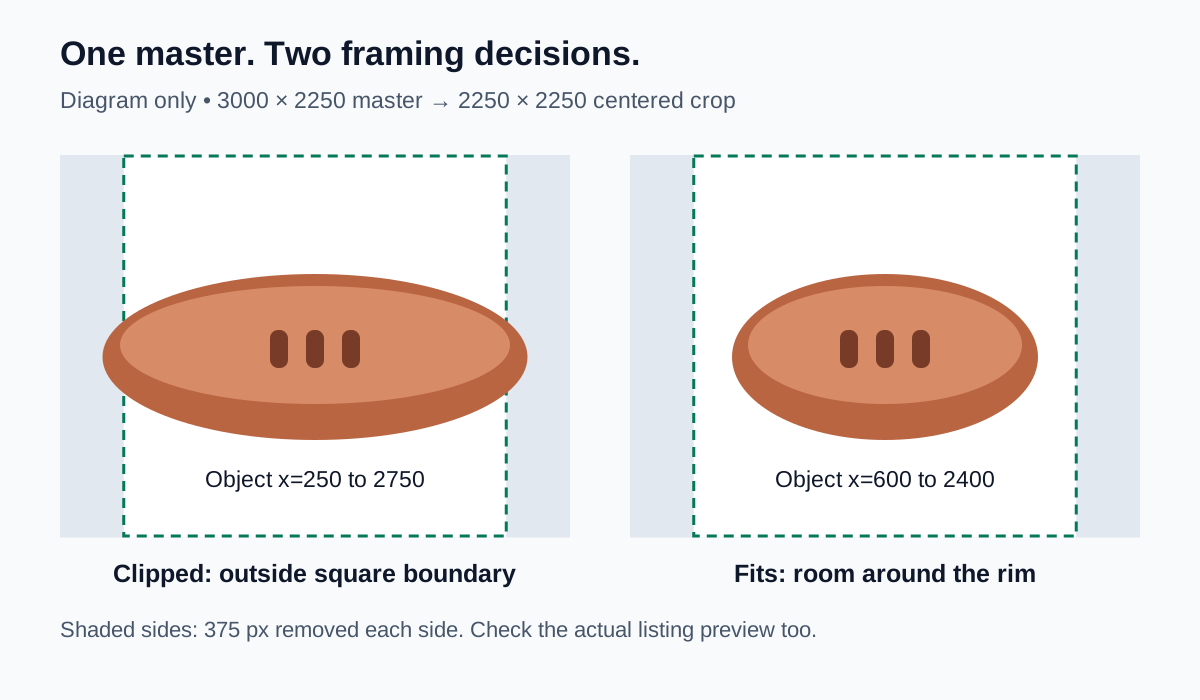
The diagram uses a 3000 × 2250 master as an example. A centered 2250 × 2250 square removes 375 pixels from each side. An object running from x=250 to x=2750 will be clipped; an object from x=600 to x=2400 fits. This calculation describes that specific crop. It is not a universal Etsy safe-area specification, and the live thumbnail still needs inspection.
Etsy currently recommends listing images at least 2000 pixels in both dimensions and a landscape or square first image. It also recommends matching the shape of the following images. Use a supported format such as JPG; a transparent PNG is unsuitable because transparent areas can appear black. Prepare sRGB web copies in your editor and inspect them after upload. These recommendations come from the image requirements linked above.
If the original capture needs excessive cropping, move the camera and take another photograph. Enlarging a small image cannot recover details that were never recorded. Keep the key product features away from the edge, but do not shrink the item until it becomes difficult to recognize.
6. Review the listing as a shopper
Upload the intended files in order and inspect the actual preview. Check the first thumbnail, full gallery, zoom and variant selection. For our example, the first image establishes one dish; the use image adds context later. The packaging image should match the chosen shipping or gift-wrap option.
Read the listing beside the photographs. If the text says three drainage slots but the edited image shows two, fix the image. If a prop could be mistaken for an included accessory, simplify that shot or explain it clearly. Check the exported file on a second ordinary device for obvious clipping or color shifts, while recognizing that different displays will not reproduce color identically.
Use the worksheet's decision column to record a concrete action: “reshoot underside,” “restore original slot edges,” or “replace packaging photo.” Avoid approving a file just because it is attractive. Save the final filenames and the date you checked the listing.
How QuestStudio helps
Once your real product photographs are usable, Image Lab can help explore one supporting scene. Choose a model with the image-input controls your reference needs, upload your approved photograph and ask for a restrained setting. Check the available controls and credit requirement before generating.
Compare the result with the source: shape, slots, glaze, quantity and shadow. A preservation instruction does not guarantee unchanged product pixels. If a model redraws important details, use the concept as a layout reference and finish with the original product in your existing editor. For that route, see the product background replacement workflow. Keep the required original photograph in the listing plan.
The useful next step is one reviewed supporting image. You can expand the gallery once that result has a clear job and accurately represents the item.
Frequently asked questions
Can I take Etsy product photos with a phone?
Yes. Begin with stable support, soft light, a clean lens and a simple background. Inspect the actual image for focus and distortion before buying more equipment.
Should every Etsy product photo have a white background?
No. A quiet background helps the first image read clearly, while later images can show use and context. Keep the actual product easy to identify and follow the requirements for your item type.
Should the first image be square or landscape?
Etsy recommends either orientation. Test the actual thumbnail with the whole product visible, then use a consistent shape for the rest of the gallery.
Can I edit every photo with AI?
Plan for Etsy's current unedited-photo requirement and check its category exceptions. For additional edited images, preserve product appearance and condition and review the result against the actual item.
How many photographs should I include?
Use enough distinct views to answer the buyer's questions about appearance, construction, size, use and what arrives. Check the current listing editor for available slots; repeated angles add little information.
Finish one listing you can repeat
Keep the originals, approve a useful gallery, test the first thumbnail and record the final files. When the next product is ready, reuse the setup notes and replace the product facts. A repeatable shoot is more useful than a folder full of attractive images with no clear place in the listing.
Hero: AI-generated editorial illustration. Diagrams and worksheet examples are original fictional teaching aids, not measured product or model tests. Prepared October 25, 2026.