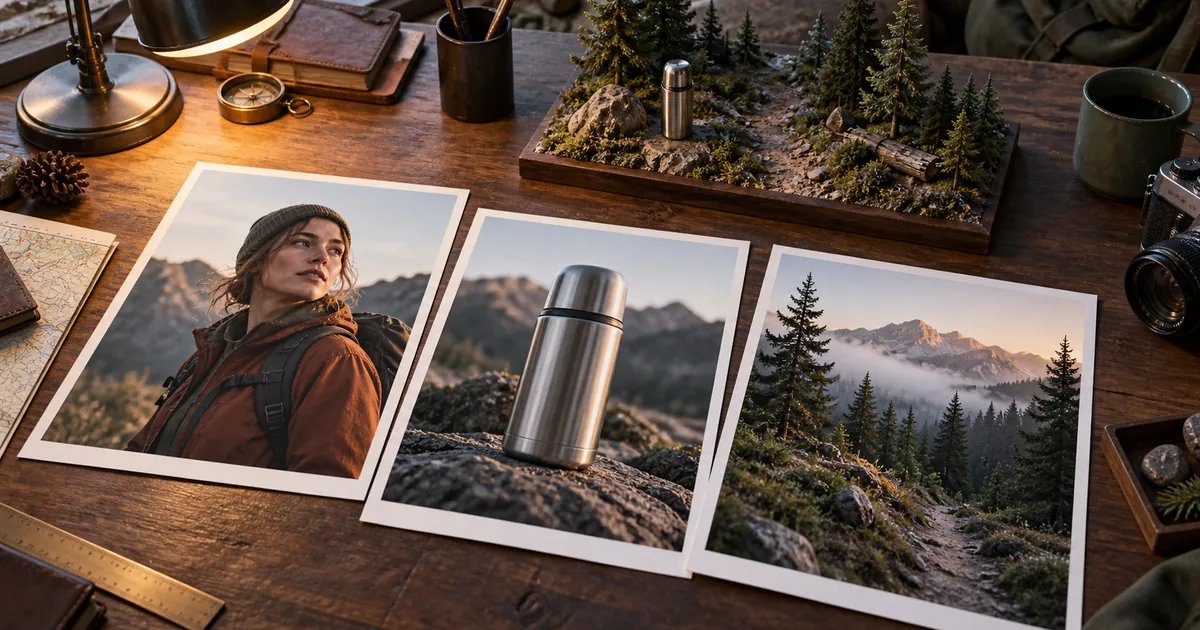

A character portrait, a product photograph, and a landscape can tell three incompatible stories. Ingredients to Video becomes useful when you decide which facts each image contributes and prevent accidental details from becoming instructions.
Download the three-ingredient brief · Create a clean reference image
Editorial guide checked September 13, 2026. Examples and worksheets are original planning material; the hero is an AI-generated illustration, not a model benchmark.
Ingredients describe elements; the prompt describes relationships
Google's Veo 3.1 Ingredients to Video announcement describes using reference images to guide recurring subjects and visual elements, including vertical-video workflows. This is useful when a written description alone leaves too much room for the model to reinvent the person or object.
A set of images does not explain the scene by itself. A thermos photograph cannot tell the model whether the hiker carries it, drinks from it, or leaves it on a rock. The prompt must supply that relationship. Reference quality and relational clarity solve different problems.
For this guide, the scene is simple: an original hiker in a rust-colored jacket stops beside a pine trail, places a steel thermos on a rock, and looks toward the path. The three ingredients are a character, an object, and a setting. The example is a planning exercise, not a published Veo benchmark.
Confirm that your interface really offers this mode
Veo is available through multiple products and integrations. The model name alone does not establish which inputs, aspect ratios, duration options, or audio controls your interface exposes. Look for a mode that explicitly accepts multiple reference images as ingredients. An ordinary image-to-video form with one starting image is not the same control surface.
Google's Gemini API announcement describes reference-image capabilities separately from video extension and frame-based controls. Keep those concepts separate when adapting a tutorial. Your current account and interface are the final check for availability.
QuestStudio lists Veo 3.1 in Video Lab, but its current input workflow does not establish support for Google's complete multi-ingredient mode. You can prepare individual ingredients in Image Lab, or use a supported single reference in Video Lab, without claiming that those are equivalent to the workflow in Google's interface.
Give each of the three images one responsibility
| Ingredient | Facts it supplies | Facts to ignore or resolve |
|---|---|---|
| Hiker | Face, jacket construction, hair, overall appearance | The portrait's unrelated room and lighting |
| Thermos | Steel material, lid shape, body proportions | The product photo's white backdrop and oversized scale |
| Pine trail | Terrain, vegetation, weather, direction of daylight | Any unwanted people, signs, or extra equipment |
Use a subject image that shows the clothing relevant to the shot. A tight face crop leaves the jacket largely unspecified. Use an object image with a clear silhouette, not a decorative collage containing three different bottle designs. Choose a setting with somewhere the action can physically occur: the thermos needs a stable rock, and the person needs room to stand beside it.
The worksheet includes a column for “must not transfer.” That is where you record a white product background or a portrait's studio light. These notes help you spot accidental borrowing in the output. They are not a promise that a model will obey a formal exclusion field.
Resolve contradictions before asking for motion
Put the ingredients next to each other at similar viewing sizes. Does the character wear gloves in one image but need bare hands in the action? Is the thermos supposed to fit in a hand, despite being shown as a huge close-up? Does the landscape imply cold overcast weather while the subject has strong orange studio light?
Some differences are harmless because the prompt can establish the final setting. Others obscure the facts you care about. If the jacket's color is unreadable under colored light, create a neutral reference. If an object has a complicated label that must be exact, plan a finishing step rather than treating a generated video frame as a verified reproduction.
A simple consistency record is enough: jacket stays rust-colored, thermos stays brushed steel with the same lid, daylight comes from camera left, and the subject moves toward camera right. Keep this record short. Twenty weak preferences can distract you from the three facts the audience actually needs to recognize.
Write one scene that uses all three ingredients
Adapt reference labels to the interface you use; do not invent a filename syntax and assume the model interprets it. If the tool allows naming the inputs, choose clear role names. Otherwise describe them in ordinary language and verify that the result uses the intended image for each role.
The action is deliberately modest. “The hiker begins an epic journey, climbs a mountain, discovers a secret, and celebrates” would require several scenes, multiple interactions, and more continuity than this first test can explain.
Inspect ingredient retention separately from scene quality
First ask whether the hiker, thermos, and trail remain recognizable. Then ask whether the scene works. A clip can preserve the jacket and bottle perfectly but place the bottle through the rock. It can also have beautiful motion while replacing the product with something else. These are different failures.
For the hiker, inspect the beginning, hand movement, and final look down the trail. For the thermos, inspect the lid, proportions, contact, and upright resting position. For the setting, check whether the rock and path remain stable when the person passes in front of them.
Listen to the contact sound and ambience as another layer. The thermos should not land before the sound occurs, and the wind should not turn into unexplained music. If exact sound is essential, plan to finish it in an editor after approving the picture.
Use a small isolation test when an ingredient disappears
If the thermos is consistently wrong, remove the human action and ask for the thermos resting on the rock. That tests the object-setting relationship without the difficulty of hands. If the result improves, the next experiment should reintroduce a simpler interaction, such as a hand entering frame to touch the lid.
If the character is wrong even while standing still, revisit the character reference before rewriting camera direction. If the landscape keeps becoming a studio, inspect the non-setting images for dominant background cues. A neutral crop or cleaner reference may provide a better correction than an increasingly long negative prompt.
Keep the last version that passed each relationship. You now have evidence that character plus setting works, or object plus setting works, even if the full interaction is still unreliable. This makes the next decision more specific than “the model ignored the prompt.”
Carry the accepted elements into the next shot
Save the original ingredients with the accepted output and brief. For a second shot, change the story action while preserving the underlying facts. A close-up of the hiker unscrewing the thermos needs a clearer hand and lid view than the wide establishing shot, so you may need a more suitable reference rather than reusing every file mechanically.
Ingredients and first/last frames answer different questions. Ingredients define who and what belongs in the scene; boundary frames describe how a clip begins or ends. Choose the control that addresses the problem you actually have, and check which combinations the interface supports.
The reusable result is a small reference set with understood responsibilities. It gives you a better foundation for related shots, makes failures easier to locate, and gives a collaborator enough context to continue the scene without guessing which visual details mattered.
Frequently asked questions
What does Ingredients to Video do?
It uses reference images to guide elements such as a subject, object, or setting in a generated video. You still need a prompt that explains their relationships and the action.
Are ingredients the same as first and last frames?
No. Ingredients describe elements to incorporate; start and end frames constrain the visual states at the boundaries of a clip. Availability varies by interface.
Does every Veo 3.1 app support three references?
No. Check the actual interface and model options. A provider can expose Veo with fewer inputs or different capabilities.
Can I prepare ingredients in QuestStudio?
Yes, Image Lab can help create individual visual references. This does not mean QuestStudio's current Veo form exposes Google's full Ingredients to Video mode.