
A useful YouTube video summary should preserve the source's main claim, required steps, exceptions, and useful timestamps. Before trusting it, compare each actionable statement with the relevant spoken passage and visible frame. A fluent paragraph can still omit a condition or recommend the opposite of what the speaker said.
This guide focuses on checking the summary after it has been drafted. It includes an original eighteen-second practice video, a timed transcript, and a claim-audit worksheet. The example summaries are authored teaching examples, not measured outputs from a competing summarizer. The practice clip was created for this exercise and has not been uploaded to YouTube.
Open the source before judging the summary
Keep the video available while you review. On a YouTube video with captions, the description can expose Show transcript. YouTube's transcript instructions explain how to view that text and jump to a passage by selecting a line. Transcript availability depends on the video having captions.
Use the transcript as a navigation aid, then listen to the important passage. Names, numbers, product terms, and short words such as “not” deserve special attention. If a sentence looks inconsistent with the demonstration, check both the audio and the frame rather than treating the caption text as the final authority.
Note which sources were available to the summarizer. A title and description are not equivalent to the complete video. Captions alone may miss an on-screen setting, a visual comparison, or a silent demonstration. Do not claim the summary checked material it never received.
Practice on a short source you can inspect
The controlled source below demonstrates a simple product-image task. It uses original mug illustrations and synthetic narration from an installed system voice. The four segments were assembled with known start times, and the finished MP4 passed a full decode check. Timing boundaries identify the authored segments rather than word-level speech alignment.
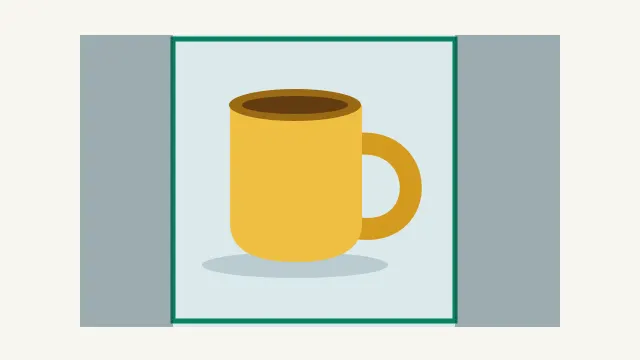
Download the practice video or read the timed source transcript. No external video account or summarization service is required for the exercise.
| Segment begins | Source instruction | Detail to retain |
|---|---|---|
| 0.00 s | Work on a copy; keep the original file | Preserve the source |
| 4.75 s | Make a square preview with the handle inside | Do not clip the product |
| 9.83 s | The crop does not replace the full-resolution export | Keep the two deliverables distinct |
| 14.08 s | Export and review the separate preview | Retain the review step |
Turn the summary into checkable claims
Break a paragraph into individual statements. “Crop the image and delete the original” contains two actions, and only one may match the source. Review them separately. For each statement, record a supporting passage or frame, a timestamp, and a verdict such as supported, contradicted, or not established.
Consider this deliberately flawed teaching summary: “At the start, make a square crop. Delete the original because the cropped preview replaces the full-resolution export.” The source explicitly says to keep the original and to retain the full-resolution export. Those are contradictions, not minor wording preferences.
A faithful compact version is: “Work on a copy and keep the original. Make a square preview that retains the handle, keep the full-resolution export separately, and review the preview before sharing.” It is still short, but it preserves the decisions someone needs to perform the task safely and accurately.
Check timestamps by visiting the passage
Follow each timestamp. It should lead near the relevant explanation, not merely somewhere in the same chapter. In the practice source, the handle instruction starts in the segment beginning at 4.75 seconds. A summary pointing to the opening preservation instruction has not supplied the right location for that detail.
Round timestamps to a useful level for the destination. A written summary of a long interview usually does not need millisecond precision. The precise values here make the controlled exercise inspectable. On a normal video, listen around the selected point and include enough context to avoid cutting off the condition that explains the advice.
If the source discusses a claim and later corrects it, the earlier timestamp alone can be misleading. Review the full relevant section and the conclusion. The summary should reflect the speaker's final position, with any meaningful qualification, rather than the first mention of a topic.
Look for omissions as well as wrong claims
A summary can contain only true sentences and still be unusable. “Make a square crop” matches part of the practice video, but it loses the handle requirement, the retained original, the separate full-resolution export, and the final review. Ask whether a reader could complete the task correctly using the summary alone.
Prioritize details by consequence. Keep the condition that changes the recommended action, the measurement that determines the setting, and the exception that limits the claim. Remove repeated introductions and decorative examples before deleting those details. The shorter-answer review guide applies the same principle to written responses.
For a visually demonstrated workflow, check the frame as well as the words. The crop boundary in our example leaves the full mug handle visible. A summary that tells someone to center the mug but ignores its handle can produce a poor preview even if the narration is otherwise summarized correctly.
Ask for a revision with a clear evidence boundary
Review this draft summary against the supplied transcript and source notes.
Split actionable statements into claims. For each claim, give the supporting passage and timestamp, or mark it unsupported or contradicted.
Retain conditions, exceptions, numbers, and required steps.
Do not invent visual evidence when only a transcript is provided.
Return a corrected summary and a short list of unresolved checks.
Provide the transcript and draft explicitly. If the system cannot access the actual video, supply your own checked visual notes and label them as such. Do not interpret an elegant revision as proof that every timestamp or frame was verified. Recheck the final actionable statements yourself.
The claim-audit CSV includes the practice contradictions and supported instructions. Replace them with claims from your real source, retaining the evidence column. That small record is more useful for a handoff than a vague note saying the summary was checked.
Use the reviewed summary in production
A verified summary can become a script outline, chapter plan, or production brief. Keep its source URL, review date, and any unresolved claims attached while it moves through the workflow. The reviewed YouTube production workflow covers the larger handoff from research to finished media.
If the next step is an original narration, use the checked script in Voice Lab, then listen to the complete output for names, numbers, omissions, and pacing. The video-summary exercise does not imply that Voice Lab retrieves or summarizes a YouTube URL. Supply the reviewed text for the task the tool actually performs.
Frequently asked questions
Is a transcript enough to verify every video detail?
No. Check the actual frames when the claim depends on a visible setting, comparison, or demonstration.
What if a YouTube video has no transcript?
Review the relevant audio and frames directly, or use another permitted source route. Do not assume a title or description represents the full video.
How precise should summary timestamps be?
Precise enough to lead to the relevant passage. Check the location directly and preserve the surrounding condition or correction.
Are the bad and good summaries measured model results?
No. They are authored teaching examples for a controlled source, used to demonstrate contradictions and omissions.
Can I use the practice files without uploading a video?
Yes. The source MP4, caption file, transcript, and claim worksheet are directly available from this article.
Narrate the reviewed script
Bring a checked original script to Voice Lab, then listen through the output. This handoff creates narration; it does not retrieve or summarize a YouTube URL.