
A wheel that seems to spin backward is not automatically a broken AI video. Repeated spokes can create a sampling illusion. A wheel that changes its number of spokes, floats above the road or stretches into an oval is a different problem.
Fix AI car video wheels by identifying which of those failures you have. Then simplify the shot, preserve the reference vehicle and compare specific moments. Adding more motion language to an already complicated prompt can make diagnosis harder.
Separate three kinds of wheel trouble
Start with normal-speed playback. Ask whether the car feels connected to the ground. Then inspect individual frames around the suspicious moment. You are looking for evidence of a changing object, not just an unfamiliar apparent rotation.
The wagon-wheel effect explanation from Science Buddies describes how sampled views of repeated patterns can suggest a different rotation. That effect does not explain a tire melting into the fender or a hub migrating across the wheel.
| Symptom | What to inspect | First decision |
|---|---|---|
| Spokes seem to reverse but the wheel remains stable | Repeated spoke pattern across frames | Consider sampling before regenerating |
| Spoke count or hub shape changes | Wheel geometry frame by frame | Treat as a continuity failure |
| Tire slides while the body travels | Contact with nearby ground landmarks | Review rolling motion and simplify the action |
| Wheel looks oval during a turn | Perspective, deformation and camera movement | Compare with the expected view |
| Tire hovers above the road | Contact patch and shadow | Reject the unsupported motion |
Do not infer exact vehicle speed or wheel RPM from an image with unknown scale and camera motion. This workflow is a visual production review, not a measurement of road performance.
Give the shot one observable movement
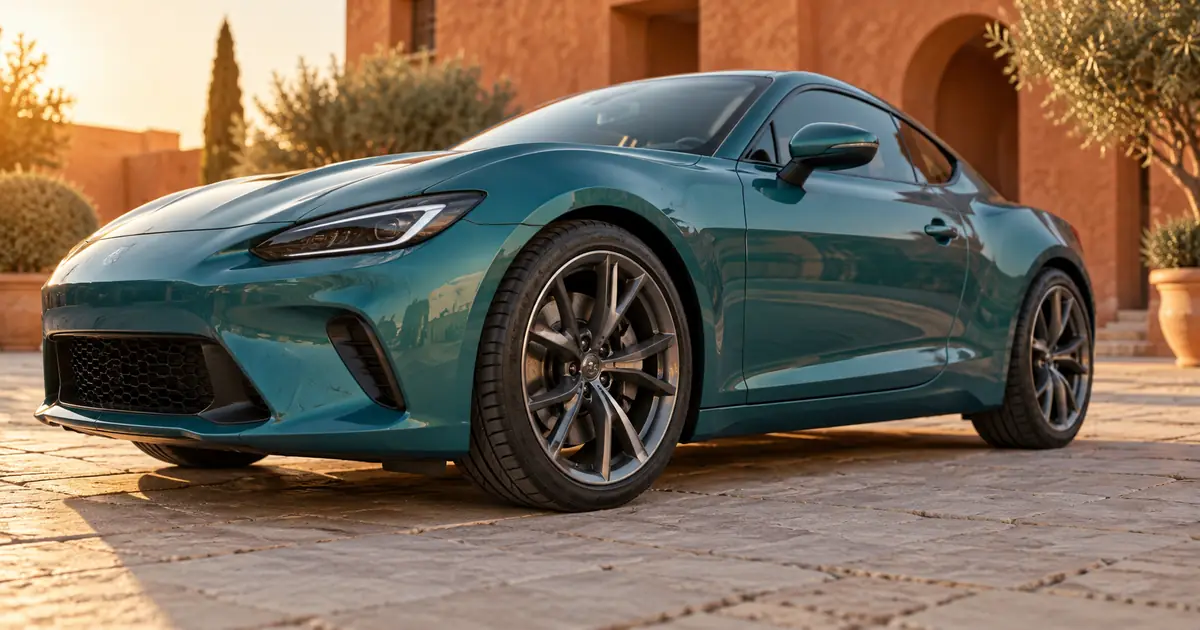
For our planning example, a fictional teal car rolls slowly across a paved courtyard in a short side-biased shot. The camera stays fixed. One front wheel is clearly visible, and a paving seam provides a ground reference.
A fixed camera makes it easier to compare body travel with wheel behavior. A simultaneous orbit, steering change, acceleration, suspension bounce and dramatic drift asks the model to coordinate many movements at once.
Decide which action serves the edit. If the purpose is to reveal the car's shape, a stationary vehicle with a restrained camera movement may be enough. If the story requires a rolling arrival, keep that action and simplify the camera instead.
Use a clean, authorized source image. The car photo workflow explains how to preserve vehicle details in stills. A video adds temporal checks: a correct first frame does not prove the same details survive five seconds later.
Prepare a reference with readable wheels
Inspect the wheel in the source before generating motion. The hub should be coherent, the tire should meet the ground and the visible body geometry should be plausible. A cropped or deeply obscured wheel provides less evidence for the movement you want.
Avoid hiding an unresolved source defect behind motion blur. Blur can make a legitimate moving wheel less distinct, but it should not be used to disguise a changing wheel shape. Fix or replace the source when its essential geometry is already inconsistent.
For an actual product or inventory listing, use accurate authorized photography and review the result against the real vehicle. Our fictional example demonstrates a shot-planning method; it is not evidence of any vehicle's condition, specification or performance.
In Video Lab, use a supported reference-image workflow and keep the prompt focused:
Check the chosen model's actual input and duration options. A prompt cannot guarantee that the requested geometry will remain correct, and not every workflow accepts the same controls.
Review the hub, rim and ground separately
Mark the visible hub center in a few frames. Its relationship to the body should remain plausible as the vehicle moves. If the hub drifts within the tire or detaches from the axle position, the issue is structural.
Next, follow the rim and outer tire. They should remain coherent shapes under the camera's perspective. Do not demand identical pixels between frames; motion, lighting and perspective change the image. Look for unexplained growth, collapse or a sudden change in design.
Finally, inspect the contact area and ground. In a rolling shot, the tire's relationship to the surface should look connected. A body that glides forward while the wheel appears pasted in place deserves closer review, although a frozen-looking repeated pattern can still involve sampling.
Use several cues together. The wheel outline, hub position, ground travel, shadow and apparent rotation provide a better diagnosis than one dramatic frame.
Build a timestamped comparison
Choose review moments that bracket the problem. For a five-second planning example, inspect the opening, one second, the middle, four seconds and the end. Add more frames around any suspected failure.
| Review moment | Body and hub | Tire and ground | Decision field |
|---|---|---|---|
| Opening | Compare with approved reference | Contact begins plausibly | Source accepted? |
| Early movement | Hub stays attached to body position | Ground travel begins coherently | Any sliding? |
| Midpoint | Wheel design remains recognizable | No floating or sudden deformation | Continue or reject |
| Late movement | No new wheel or fender geometry | Contact remains consistent | Locate first failure |
| Ending | Vehicle still matches the scene | Motion ends without a jump | Safe edit point |
This table is a review plan, not a report of a tested model. Fill it with observations from your own output. Keep the original clip available so reviewers can see the event at normal speed.
The wheel-motion worksheet separates geometry, contact and apparent rotation. It also records the first failing timestamp, which is more actionable than “the wheels look weird.”
Change one demand for the next attempt
If geometry fails during a steering change, try a straight path. If the wheel is too small to evaluate, adjust framing. If a fast camera move hides the relationship to the ground, hold the camera still.
Keep the accepted reference and the rest of the prompt stable while changing that one demand. This makes comparisons useful. If you change lighting, car design, camera angle and motion together, you may get a better-looking clip without learning what solved the failure.
Do not rely on repeated negative phrases to enforce a physical simulation. “No bad wheels” is less informative than a simple shot with visible contact and limited motion. The output still requires review.
If an early portion is usable and the wheel fails later, trim only when that shorter shot fulfills the edit. A short clean arrival may work; a cut that hides the promised action may not. The AI clip editing guide helps place a usable excerpt into a larger sequence.
Check any speed or frame conversion
Editing can introduce another layer of motion artifacts. Compare the original generated file with the retimed or converted version before requesting a new generation. Optical-flow interpolation may invent details between frames, especially around repeating spokes.
Test the export at the intended playback rate. Frame stepping is useful for structural review, but the audience experiences motion over time. A candidate should pass both the detail check and ordinary playback.
If a retime creates the defect, return to the original speed or use a different editorial decision. If the source itself changes wheel geometry, a cleaner export cannot restore the missing continuity.
The walking-video foot-contact guide addresses another ground-contact problem. Its broader idea of checking body movement against the surface is useful, but rotating spokes require the additional sampling distinction described here.
Frequently asked questions
Why do AI car wheels sometimes look like they spin backward?
A repeated spoke pattern can appear to reverse when sampled across frames. Inspect whether the wheel's geometry remains stable before deciding that apparent reverse rotation is a generation failure.
Can I calculate the car's speed from the wheel animation?
Not reliably without the necessary scale, timing and camera information. This review checks visual coherence; it does not establish real-world speed or performance.
Will more motion blur fix a changing wheel?
It may conceal detail but does not correct a wheel that changes shape or detaches from the car. Simplify the source or shot and inspect the resulting geometry instead.
Should I ask for a parked car instead?
That is a useful alternative when the creative goal is a vehicle reveal rather than visible driving. Choose the movement that serves the scene, then make it easy to inspect.
Why did the wheel get worse after editing?
Retiming or frame interpolation can create new artifacts around repeated patterns. Compare the original and edited files at the same moment to identify whether the defect began in generation or post-production.
Keep the rolling shot simple enough to judge
Use one readable wheel, one clear movement and a stable ground reference. Once the clip passes those checks, place it in the edit. A restrained shot with consistent geometry usually gives you more useful material than a complex take whose motion cannot be trusted.
Test one simple rolling shot in Video Lab
Hero image: AI-generated editorial illustration. Examples are original planning exercises, not measured model tests.
Continue with a useful next step
 Video
VideoAI Video Speed Ramps: Smooth Timing Without Warped Motion
Create smooth AI video speed ramps with a clean source and deliberate timing. Protect contact frames, budget duration, and check interpolation before export.
 Video
VideoTopaz Video Frame Interpolation: Choose Smooth Motion Without Warping
Choose frame rate and slow-motion settings in Topaz Video, calculate the frames you need, and test ball contact, occlusion, and cuts before a full export.
 Video
VideoAI Video Mirror Reflections: Fix Motion and Geometry
Fix mirror reflections in AI video by checking the source geometry, matching reflected actions and choosing a simpler shot, local repair or composite.