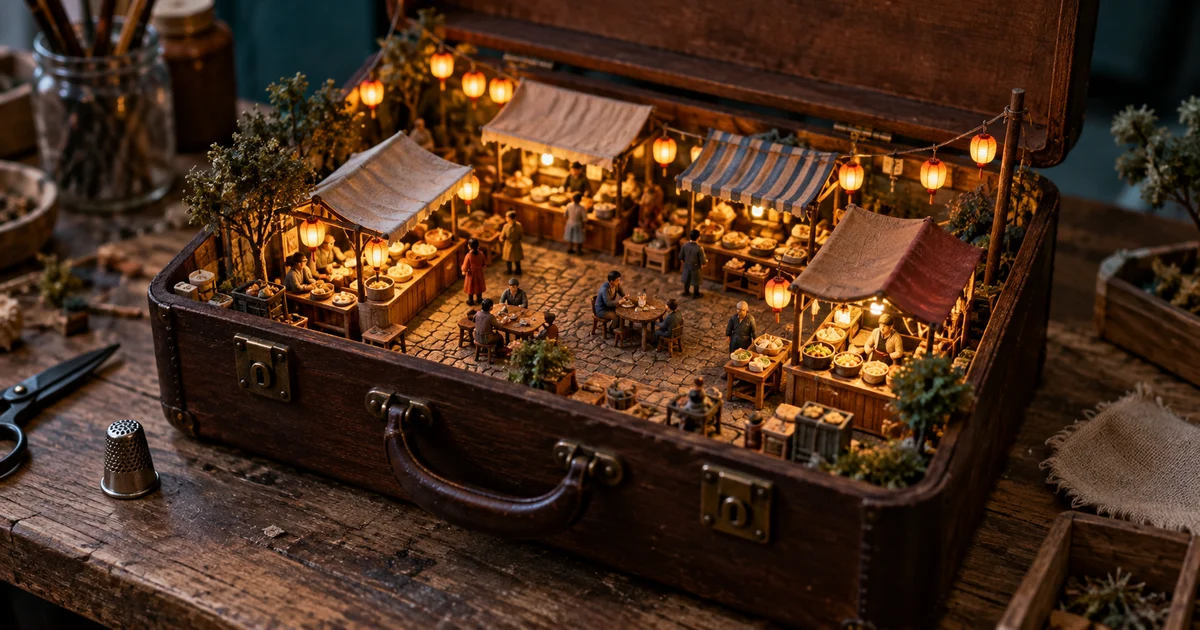

A tiny café can still look like a full-size café photographed from far away. The miniature effect comes from relationships: a door beside a figurine, a building beside a real thimble, and materials that look cut, glued, painted, or stitched. This workshop makes those relationships deliberate.
Download the miniature scene plan · Build your miniature scene
Begin with a small story, not a long inventory
Give the scene a verb. A baker lifts a tray, a station keeper lights a lamp, or a gardener checks a seedling. That action makes the world legible before the viewer notices every roof tile. A prompt containing twelve shops, a train, a waterfall, flying boats, and crowds can produce detail without a clear subject.
For our original example, the story is an evening market closing inside a suitcase. One stall is still lit; the others are quiet. The suitcase supplies a boundary, the workbench supplies a surrounding world, and a thimble supplies scale. You can explain the image in one sentence. That is a useful constraint when a generated scene starts collecting unrelated objects.
Write three essentials and three optional details before generating. Protect the open suitcase, last illuminated stall, and scale reference. Treat bunting, puddles, and background figurines as optional. If the first image is crowded, remove an optional element instead of abandoning the entire concept.
Make the size relationships agree
Calling something “1:24 scale” communicates an intention; it does not make the model calculate a reliable miniature. Use visible comparisons as well. The stall counter should suit the figure behind it. The doorway should be taller than that figure. The real thimble outside the case should clearly belong to a larger world.
| Relationship | What to inspect | Useful correction |
|---|---|---|
| Person and doorway | Can the figure plausibly pass through? | Make all doors slightly taller than the figures |
| Counter and vendor | Is the counter at a usable height? | Keep the counter near the vendor’s waist |
| Scene and container | Does the whole market fit inside the case? | Keep buildings within the inner case boundary |
| Miniature and scale object | Does one real object establish the illusion? | Retain a single thimble outside the miniature |
Do not include several ambiguous reference objects. A giant coin, a tiny mug, and an oversized hand can imply three incompatible scales. One familiar object with an unambiguous position usually gives the viewer enough information.
Choose materials that survive a close look
Miniatures become convincing when their surfaces suggest how someone could have made them. Painted card suits walls, stained balsa suits counters, and clay suits simple figurines. A felt landscape needs soft fibers and slightly rounded edges; a resin model should have different surface behavior. Mixing every craft material in one object makes its construction difficult to read.
Use a small material system: two dominant materials and one accent. For the suitcase market, choose painted card buildings, clay figures, and translucent paper lanterns. The brief should allow small handmade imperfections without requesting dirt everywhere. A bent paper awning is useful texture. Random cracks in every wall turn a cozy market into a ruin.
For an isometric look, ask for a clear elevated three-quarter view. For a photographed model, ask for a tabletop camera angle and controlled depth of field. Do not require both a perfectly orthographic blueprint and strong photographic perspective in the same image.
Five original miniature diorama prompts
These are creative starting points, not examples of measured model performance. Each solves a different composition problem. Begin with the one closest to the asset you need, then alter the subject and materials while keeping its scale logic.
1. The suitcase night market
2. The teacup greenhouse
3. The matchbox observatory
4. The felt repair shop
5. The seaside drawer
Keep the focal plane wide enough to tell the story
Very shallow focus can make a model look small, but it can also erase the entire subject. If the vendor is sharp and the stall is unreadable, the viewer loses the relationship that explains the scene. Ask for the main action and its immediate surroundings to remain clear, with softer focus outside that area.
Inspect the image at the size it will appear in a feed. Can you still identify the suitcase and the last open stall? If not, simplify the composition or move closer. Adding “8K” will not fix a story that occupies twelve pixels. Keep an uncropped master, then make a square or vertical crop around the action without cutting away the scale cue.
Repair the miniature illusion one layer at a time
If the scene looks full-size, make the outer container more visible and emphasize constructed edges. If figures become giants, correct their relationship to the doors and counters. If materials look like smooth plastic, name the desired surface on a specific object rather than increasing global texture.
A targeted revision might say: “Keep the suitcase, lighting, and stalls. Reduce the vendor so their head is below the doorway lintel, and keep their hands at counter height.” Compare the whole image afterward; a local instruction can still change unrelated details. Save the last accepted version so a correction does not become a new starting point by accident.
Add motion only after the world makes sense
For an animated version, choose one small action: the lantern sways, the vendor lowers the awning, or the boat rocks slightly. A large camera orbit asks the video model to invent hidden walls and the back of the miniature. Begin with a locked view or a modest push toward the subject.
Keep the scale object stationary and visible during the test. If the thimble shrinks or the suitcase flexes, the illusion breaks even when the foreground motion is attractive. For a recurring character, prepare a simple reference sheet before making a series of different scenes.
How QuestStudio helps
Use Image Lab to draft one composition, save the accepted image, and compare a single material or scale correction. Choose an image-editing model when revising an existing result. Move the approved still to Video Lab only when you can name the motion you want.
The finished asset is one readable miniature scene with a consistent size system. A second angle is a separate continuity task, not something the first image proves. The downloadable plan keeps your container, materials, scale reference, and accepted prompt together.
Source and illustration notes
Google’s native image-editing examples document transformations involving small models and retained subjects. The five scenes, prompts, and review method here are original editorial material. The hero is an AI-generated illustration; it is not evidence of exact physical scale or a fabrication-ready 3D model.
Frequently asked questions
What makes an AI miniature diorama look small?
Consistent size relationships, a visible container or display base, a familiar larger object, and believable model-making materials work together. Blur alone is not enough.
Can I use a photo as the starting point?
Yes, with an image-editing workflow that accepts a reference. Decide which recognizable features matter and compare them after the transformation.
Do these prompts create printable 3D models?
No. They describe raster images. A visually convincing image does not establish watertight geometry, real dimensions, or printability.
Why does my diorama look like a normal city?
The surrounding tabletop and scale cue may be missing, or the surfaces may look full-size. Make the physical base and construction materials explicit.
What should I animate first?
Try one small action with a stable camera, such as a swaying lantern. Inspect the container and scale reference throughout the clip.
Continue with a useful next step
 Image
ImageAI Coloring Pages: Build Line Art That Works on Paper
Create printable AI coloring pages with readable shapes, repaired line gaps, deliberate detail, and a real-size paper test before making a collection.
 Image
ImageAI Comic Book Workflow: Build Your First Finished Page
Start an AI comic book with one complete page: a six-panel script, character references, lettering and continuity checks. Download an editable panel ledger.
 Image
ImageAI Anime Generator From Photo: Keep the Person Recognizable
Use an AI anime generator from photo without losing the person. Prepare a strong reference, lock identity cues, control stylization, and repair face drift.