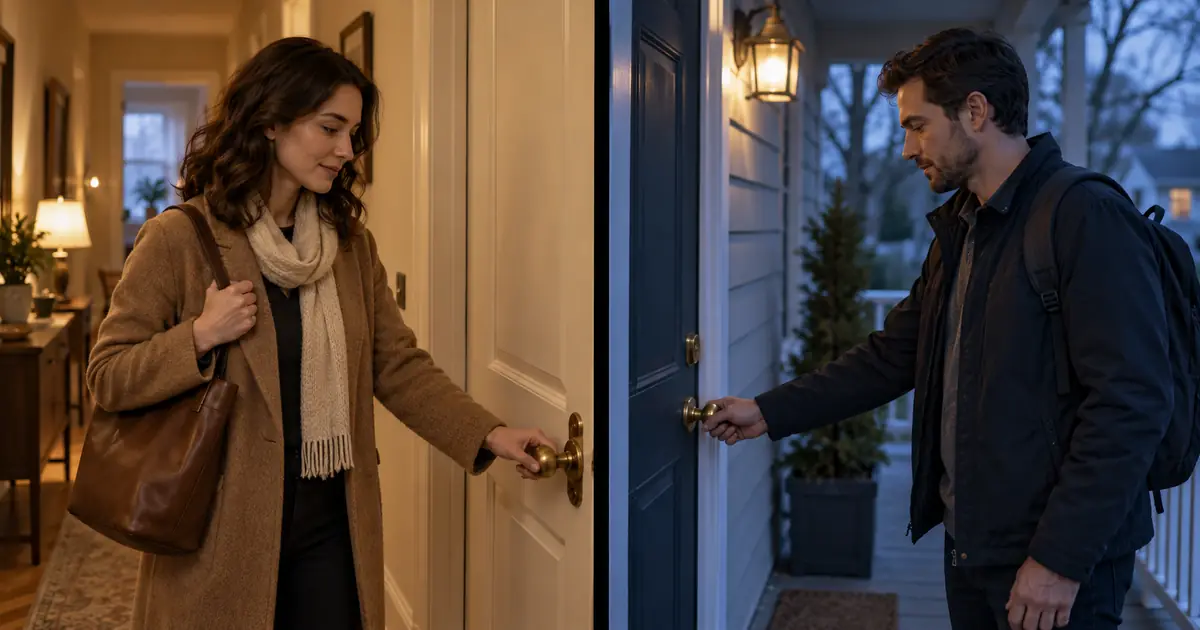

A split-screen video asks the viewer to compare two things at once. If one face is cropped badly, the actions miss each other or both soundtracks compete, the layout becomes a distraction.
Create AI split-screen video from separate clips, then control the panels in a video editor. Plan the panel dimensions before generating, choose one visible event to synchronize and decide which audio deserves attention. This keeps the composition editable when a shot needs changing.
Choose the relationship between the panels
Two panels can show simultaneous events, a comparison, a conversation or a cause and response. Pick one relationship before creating clips. The viewer should understand why the images share the screen.
Our example shows two fictional people arriving at different doors. The left panel is a warm apartment hallway; the right is a cool porch. Their hands reach the door handles at the same moment. The comparison is the synchronized gesture, not matching every movement.
Write that purpose in a sentence: “Two separate arrivals meet on one shared beat.” It helps you reject extra action that steals attention, such as one person waving while the other searches for keys.
For sequential cuts rather than simultaneous panels, use the AI clip editing guide. A split screen introduces additional crop, timing and audio decisions because both clips remain visible together.
Calculate the panel space before framing
For a 1,920 by 1,080 landscape canvas with a 16-pixel vertical gutter, subtract the gutter from the full width. Divide the remaining 1,904 pixels by two. Each equal panel is 952 by 1,080 pixels.
The left panel occupies horizontal pixels 0 through 951. The gutter occupies 952 through 967. The right panel starts at 968 and ends at 1,919. Those coordinates describe the final canvas, not the source clip dimensions.
| Layout field | Worked example |
|---|---|
| Final canvas | 1,920 by 1,080 pixels |
| Gutter | 16 pixels |
| Space remaining for footage | 1,904 pixels wide |
| Each equal panel | 952 by 1,080 pixels |
| Left panel center | 476, 540 in edge-based coordinates |
| Right panel center | 1,444, 540 in edge-based coordinates |
These panels are close to portrait shapes. A wide source shot may lose much of its left and right sides when filling one. Frame the subject and door handle within the intended panel area, with room for the hand's full movement.
In an editor, fitting a clip preserves the complete image but can leave empty space. Filling the panel can crop it. Adobe's Properties panel documentation describes positioning, scaling and cropping controls for Premiere; other editors provide their own equivalents.
Generate each action independently
Start with the left panel in Video Lab. Ask for a restrained shot whose important action remains near the center. Use the supported aspect ratio and reference options available in the selected workflow.
Create the right panel separately with its own person, porch and visual treatment. Do not ask the model to generate the final split-screen frame if you need independent crop and timing control. A baked composite is harder to repair when one hand or one doorway fails.
Inspect each clip before combining them. Both should work as individual shots. A layout cannot fix changing fingers, a disappearing handle or a door that bends during contact.
Use the AI establishing-shot guide if the location needs a clearer visual identity. Keep the actual arrival shots simple enough that the gesture remains the main event.
Align one visible event
Choose a precise anchor such as the first frame where the hand touches the handle. Avoid vague labels such as “the person arrives,” which can refer to several different moments.
Suppose contact occurs at 2.4 seconds in the left source and 3.1 seconds in the right source. You want both contacts at 2.0 seconds on the final timeline. Trim 0.4 seconds from the beginning of the left source and 1.1 seconds from the right.
The relationship is straightforward: source event time minus source in-point equals timeline event time, when both clips start at timeline zero and play at normal speed. If a clip begins later on the timeline, include that offset too.
| Clip | Source contact | Source in-point | Contact on timeline |
|---|---|---|---|
| Warm hallway | 2.4 seconds | 0.4 seconds | 2.0 seconds |
| Cool porch | 3.1 seconds | 1.1 seconds | 2.0 seconds |
These are planning numbers, not measurements from generated footage. Mark your actual event frames in the editor. At a fixed frame rate, round edits to real frame boundaries and check the resulting alignment visually.
Do not force every preceding motion to match. The different approaches can make the shared contact more interesting. If the action before contact is too short in one source, regenerate with more lead-in or change the edit rather than stretching a few frames excessively.
Preserve room before and after the action
The clips need enough material on both sides of the synchronization point. A source that begins with a hand already on the handle leaves no approach to show. One that ends at contact may prevent a natural hold.
Choose the final length after checking those available handles. If one panel runs out first, a deliberate transition can be better than an unexplained freeze. A freeze frame may work stylistically, but it should read as a choice.
Be cautious with heavy retiming. Interpolated frames can distort hands and handles. Compare any speed-adjusted version with the source, particularly around the moment you are trying to emphasize.
The split-screen planning worksheet records panel dimensions, source event times, in-points and the available tail. It makes a revised take easier to swap in without guessing the original timing.
Decide where the viewer should listen
Two independent soundtracks can compete even when the pictures align. Choose a clear audio plan: one shared music bed, one primary scene sound, or a deliberate alternation between the panels.
For the arrival example, a restrained shared ambience and one emphasized handle click may be enough. Do not leave unrelated generated dialogue or background noises running simply because they came with the clips.
Check whether the sound suggests a physical connection you did not intend. Two doors in different places do not have to share identical acoustics. If you use a stylized synchronized click, make that an intentional editorial cue.
Listen through the entire transition into and out of the split screen. An abrupt jump from two ambient beds to one can distract more than a small visual mismatch. Match the edit's overall listening experience, not only the center of the scene.
Recompose for a vertical delivery
A 9:16 version needs its own layout decision. Shrinking the complete landscape composite may make both people too small. Cropping the middle can erase the subjects or the door handles.
Consider stacked panels, a sequence of alternating shots or a different crop from the original sources. For a 1,080 by 1,920 canvas with a 16-pixel horizontal gutter, two equal stacked panels are each 1,080 by 952 pixels.
That changes which parts of the source remain visible. Recheck the hands and faces rather than assuming the landscape crops will transfer. Keep captions and any necessary labels readable at the actual viewing size.
If your two clips become a single continuous scene in another edit, the screen-replacement workflow is a separate compositing task. Do not confuse tracking content onto a screen with placing two independent panels on the canvas.
Frequently asked questions
Should I generate both panels in one AI video?
Separate clips give you independent timing, crop and replacement control. A single generated composite may be suitable for an experiment, but it is harder to revise when only one panel fails.
How wide are two panels on a 1080p canvas?
On a 1,920 by 1,080 canvas with a 16-pixel vertical gutter, each equal panel is 952 pixels wide and 1,080 pixels tall. Change the calculation when the canvas or gutter changes.
Do both clips need exactly the same motion?
No. Choose the event that matters to the comparison and align that moment. The approach and follow-through can differ if the relationship remains clear.
Can I fix the timing by speeding up one panel?
Sometimes, but retiming may distort moving details. Try source in-points first, then inspect any speed change around hands, faces and other important motion.
Can I reuse the landscape composite as a vertical video?
You can, but it may become too small or crop away the action. A dedicated stacked layout or a new edit from the original clips usually gives you more control over readability.
Create the first panel clip in Video Lab
Hero image: AI-generated editorial illustration. Examples are original planning exercises, not measured model tests.
Continue with a useful next step
 Video
VideoAI Interview B-Roll: Build a Shot List From a Transcript
Build an interview B-roll shot list from transcript beats. Choose real footage, diagrams or AI illustration, then check relevance, continuity and edit fit.
 Video
VideoAI Video Generator vs AI Video Editor: Which Tool Do You Need?
Compare AI video generators and AI video editors by job, input, control, failure risk, and workflow so you choose the right stage instead of the wrong tool.
 Video
VideoAI Video Screen Replacement: Keep the Real UI Clear
Put a real screen recording into an AI video. Plan a stable device, track the display, preserve hand occlusion and check readable UI in the final export.