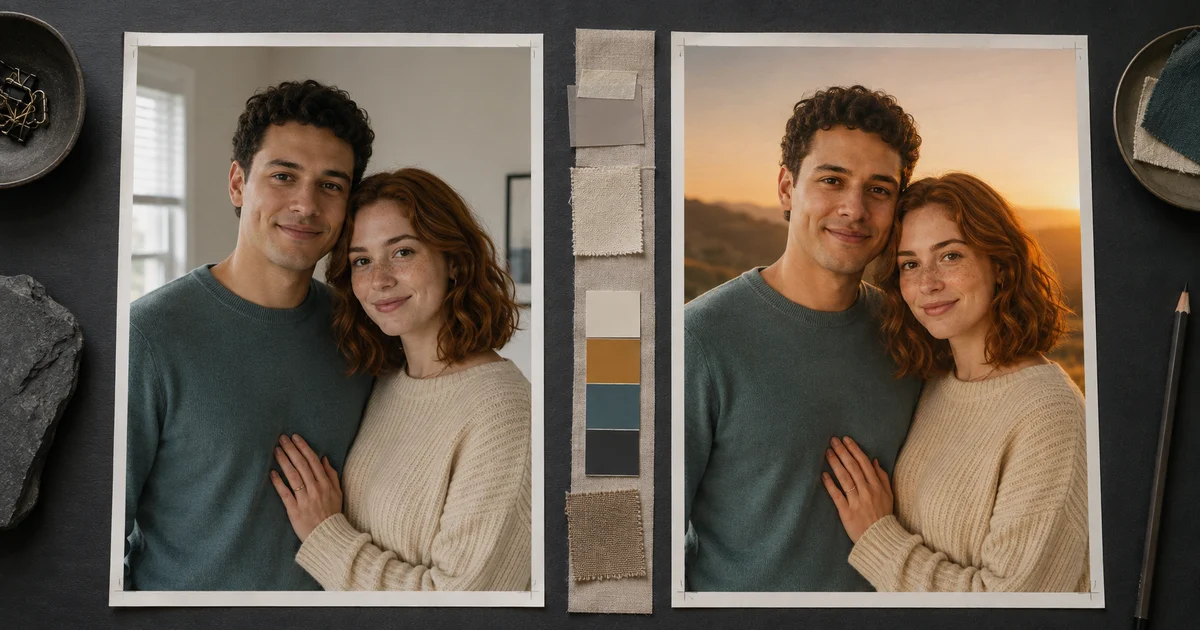

ChatGPT couple photo editing prompts fail when they describe the mood beautifully but treat two people as one subject. The model may preserve the larger face, redraw the smaller one, merge facial traits, swap hair, invent matching smiles, or rebuild hands where the bodies touch. A stronger prompt gives each adult a separate identity record and limits the edit to one visible job.
OpenAI's current ChatGPT Images guide documents uploading an existing image and describing the change, including a specific area. It also notes that a selected edit can extend beyond the highlighted region, so a mask is not proof that the rest stayed untouched. Use the source as evidence, compare the complete output, and keep the original. This guide focuses on that reviewable workflow rather than promising a magic phrase.
Quick answer
Start with a sharp authorized photo where both faces are similarly visible. Label the people as Person A and Person B. Write separate locks for face shape, eyes, hair, skin tone, age, expression, clothing, relative height, pose, and hand placement. Request one change, compare both faces at the same crop, and repair only the person or region that drifted.
Why two faces are harder than one
A single portrait gives the model one identity, one pose, and one set of facial relationships. A couple photo adds a second identity plus the distance, scale, overlap, eye lines, hands, and contact points between them. If one face is smaller, darker, turned farther away, or partially covered, it supplies weaker evidence and is more likely to become generic.
Do not solve this by repeating “keep faces 100% exact.” That phrase does not define what exact means, and no generative edit guarantees identity fidelity. Instead, make the constraints observable. If the output fails, you should be able to name whether the jaw, eye spacing, hairline, expression, height relationship, or left hand changed.
Choose a source that treats both people fairly
Use one shared photo when possible. Both adults should be sharp, similarly large in frame, close to the same camera plane, and lit well enough to see the eyes and face edges. A normal phone or portrait-lens perspective is safer than an arm-length ultra-wide selfie that stretches the nearer person.
Avoid heavy beauty filters, motion blur, deep colored shadows, reflective glasses, hair crossing the eyes, cropped heads, and hands covering facial landmarks. If one person is noticeably softer or smaller, use a second authorized portrait only as an identity reference and state that it must not replace the shared photo's pose or composition.
Strong shared source
Both faces visible, similar scale, natural perspective, believable skin texture, clear hair silhouettes, and uncluttered contact points.
Risky shared source
One tiny or shadowed face, extreme selfie distortion, crossed limbs, face filters, motion blur, clipped hair, or an obstructed jaw.
Build a two-person identity map
Write one short row for each person before describing the new scene. Use visible features, not praise or guesses about ethnicity, personality, or attractiveness. Keep temporary styling separate from identity.
| Subject | Preserve | Relationship lock |
|---|---|---|
| Person A | Face width, eye spacing, brows, nose, mouth, hairline, hairstyle, skin tone, apparent age, expression, clothing | Original side of frame, relative height, head angle, arm position, and distance from Person B |
| Person B | Face shape, eye tilt, freckles or marks, hair silhouette, skin tone, apparent age, expression, clothing | Original side of frame, relative height, shoulder overlap, hand placement, and eye line |
| Shared scene | Pose, crop, lens perspective, body proportions, contact points, jewelry, and documentary facts | Change only the named background, lighting, color grade, or crop |
When two separate references are unavoidable, label them clearly: “Image 1 is Person A's identity reference. Image 2 is Person B's identity reference. Image 3 controls the shared pose and framing.” Never make the model infer those roles.
Use one preserve-change prompt
Upload the authorized source first, then replace every bracket. The first pass should improve one property—not relocate the couple, redesign their clothes, change the pose, and restyle the image simultaneously.
The phrase “change only” matters because it defines the job. After the first acceptable edit, save that output and start a new pass for the next change.
Use pose ideas without rebuilding the relationship
Current search interest around couple poses is stronger than the narrower AI phrase, but pose changes are not simple retouching. Moving an arm or turning a head forces the model to redraw bodies, contact points, clothing folds, and often faces. If the existing pose works, preserve it.
For a newly generated concept, choose one readable interaction: walking side by side, sitting with shoulders lightly touching, sharing a quiet laugh, or looking in the same direction. State where each visible hand rests and keep limbs separate. Avoid “romantic pose” by itself; it invites generic staging and ambiguous anatomy.
Five couple photo editing prompts
1. Replace only the background
2. Correct harsh mixed lighting
3. Clean one distraction
4. Create a social crop
5. Composite two authorized portraits
Audit each person, then the pair
Place the source and result at the same crop and size. Review Person A alone, Person B alone, and only then the relationship between them. A warm color grade can make the whole image feel successful while one person has quietly become a stranger.
| Pass | Check | Reject when |
|---|---|---|
| Person A | Outer face shape, eyes, brows, nose, mouth, hairline, marks, expression, skin texture | Any high-value relationship changed or the person needs explanation to be recognized |
| Person B | Repeat the same review independently at equal zoom | The smaller face became generic, smoother, younger, or borrowed traits from Person A |
| Pair | Relative height, spacing, gaze, shoulder overlap, hands, jewelry, clothing, shadows | Bodies intersect, hands merge, the pose changes, or one person appears on the wrong side |
| Destination | Final crop, thumbnail size, compression, disclosure, and permission | Either face or a contact point fails at the actual display size |
Repair one person or one region
If Person B's eyes drift, do not regenerate the scene. Request: “Restore only Person B's original eye spacing, lid shape, brow angle, and gaze from the source. Keep Person A, both hairstyles, expressions, pose, clothing, background, lighting, crop, and every other pixel relationship unchanged.” Then compare again.
If several facial regions changed, return to the last faithful version and reduce the edit. A locally selected region can help, but the provider warns that edits may extend beyond the highlight. One-region repair is a controlled test, not permission to skip the full comparison.
Get permission and keep the untouched photo
Ask both adults and the photo owner before uploading or transforming the image. Explain the intended change and destination. Do not create deceptive relationship imagery, intimate material, or public composites without clear consent. Be especially cautious with workplace, memorial, medical, political, or other sensitive contexts.
Keep the original, references, prompt, model, date, rejected versions, selected output, and both approvals together. The AI commercial rights checklist offers a broader production record; it is not legal advice.
Test the same controlled brief in QuestStudio
ChatGPT's current image workflow accepts uploaded photos and described edits. If you want to compare that brief in QuestStudio, keep the same source, identity map, edit boundary, and approval checklist. The image-to-image AI guide explains the general preserve/change method.
Open Nano Banana Pro 4K in Image Lab and test one bounded edit. Count success when both people remain recognizable and the result is usable—not when the generation merely finishes.
Frequently asked questions
How do I edit a couple photo without changing either face?
Upload a clear authorized source, identify each adult separately, and request one bounded change. Preserve both face shapes, eye spacing, skin tones, hairstyles, apparent ages, expressions, clothing, pose, relative height, and hand placement. Compare each person with the original before accepting the edit.
What source photo works best for a couple edit?
Choose a sharp image where both faces are similarly large, evenly lit, unobstructed, and close to the same camera plane. Avoid extreme wide-angle selfies, deep shadows, heavy filters, motion blur, cropped hair, reflective glasses, and overlapping hands near either face.
Why does one face change more than the other?
The smaller, darker, more angled, or more obstructed face usually provides weaker reference information. Restate that person's observable identity anchors, reduce the size of the requested edit, and repair only that face while keeping the other person and scene unchanged.
Can I combine two separate portraits into one couple photo?
You can attempt a composite, but it is a higher-risk job than editing one shared photo. Use authorized references with compatible camera height, light direction, resolution, and head angle; label each person; define their relative height and position; and review identity, scale, shadows, hands, and contact points.
Can I upload my partner's photo to an AI editor?
Ask the person and the photo owner for permission before uploading or transforming the image. Explain the intended edit and where the result may appear. Keep the untouched original, avoid deceptive or sensitive uses, and review the provider's current privacy and usage terms.
Continue with a useful next step
 Image
ImageAI Car Photo Editing for Dealers: Keep the Vehicle, Change the Setting
Edit dealership car photos with AI while preserving the actual vehicle. Plan six views, protect trim and condition, check reflections, and organize listing exports.
 Image
ImageAI Photo Editing vs Image Generation: Choose the Safer Workflow
Decide when to edit a real photo, regenerate a concept, composite verified elements, or retake the source based on truth, control, and risk.
 Image
ImageDay-to-Dusk Photo Editing: Keep the Property Accurate
Turn a daytime real estate photo into a restrained dusk edit. Choose the right source, check five lighting zones and preserve the property’s actual features.