
Use AI packaging design for visual exploration and mockups, then build the chosen direction on the printer's actual production template with a designer. An attractive generated box does not establish its dimensions, material behavior or print readiness. Keep the concept image and the manufacturing file separate throughout the project.
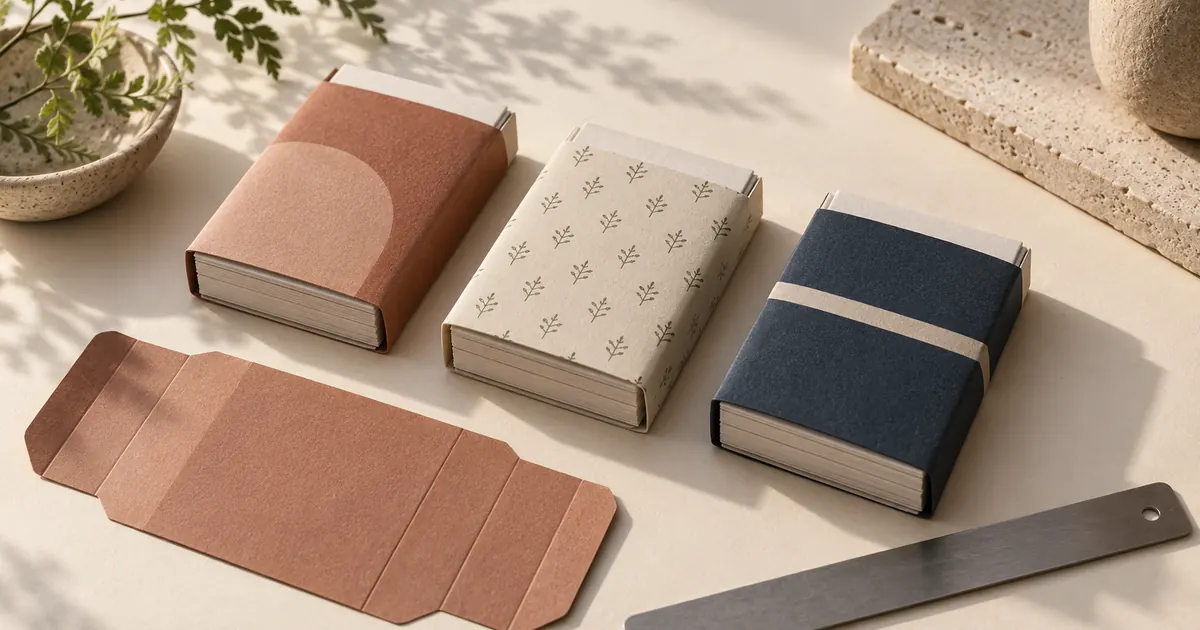
Here we will plan a paper sleeve for a fictional set of stationery cards. You will get three distinct creative directions, a comparison scorecard and a handoff checklist. The hero is an AI-generated concept illustration, not a photographed manufactured pack or proof that a supplier can produce it.
Decide what the packaging needs to do
Before prompting, identify the product, selling channel and buying decision. A sleeve around cards must reveal enough about the set to make sense on a shelf or in a small online thumbnail. A shipping carton has a different job. Do not let the generator decide the package format just because its first image looks expensive.
For our example, the product is a set of twelve blank note cards with envelopes. The buyer wants a small gift that feels considered. The proposed format is a removable paper sleeve around the set, subject to the supplier confirming its fit. The design should leave an obvious place for the product name, card count and description.
Ask the supplier for the real dimensions, stock options, printing constraints and template before treating the concept as a production plan. If those details are not ready, write “to be confirmed” in the brief. A beautifully rendered foil edge or embossed surface should remain an optional idea until its feasibility and cost are known.
Build three directions that differ in one meaningful way
Useful concept exploration tests a design decision. Three random palettes with different camera angles are hard to compare. Hold the package shape, viewing angle and background steady while changing the visual language.
| Direction | Visual idea | Question it helps answer |
|---|---|---|
| Quiet color | One broad clay-colored shape on a pale sleeve | Can a simple shape feel giftable without decoration? |
| Botanical detail | A small original repeating leaf motif on cream | Does fine detail communicate the desired handmade character? |
| Graphic contrast | A deep navy field and a single pale stripe | Does a bolder treatment remain clear in a small shop thumbnail? |
These directions are not ranked. The right one depends on the actual brand, audience and production constraints. A botanical motif might suit a garden shop and feel unrelated in an architectural stationery collection. Write the reason each direction belongs in the test before asking for images.
Keep a fourth “plain baseline” mockup if you can. It helps you see whether added decoration improves recognition or simply makes the pack busier. Avoid using a competitor's exact label, distinctive layout or recognizable brand assets as the design brief.
Generate a concept without asking AI to invent the label
Start with a blank mockup for visual direction. Add exact names, quantities and required information later as editable type in an appropriate design tool. This keeps the comparison focused on composition and material impression rather than plausible-looking text that may be wrong.
For the next direction, change only the sentence describing the color and pattern. Keep the rest of the request and the output framing consistent. If a model invents a rigid box instead of a sleeve, reject it before comparing aesthetics. You would otherwise be choosing between different products.
When you already have a manufactured blank, use an authorized photograph as the reference in a model that supports image input. Check whether the output preserves its folds and proportions. An instruction to keep geometry fixed is a request, not a guarantee.
Evaluate the designs at the size customers will see
Review the concepts side by side in the same crop. Inspect them once at a comfortable design-review size and again as small thumbnails. The second view often reveals that a fine pattern looks like visual noise or that an attractive stripe competes with the product name.
Use a simple scorecard, but write a reason beside each number. A score without an explanation can hide a disagreement about the brief. The following criteria are proposed review questions, not measured customer preferences:
| Criterion | A useful review question | What a low score calls for |
|---|---|---|
| Product clarity | Can someone tell what is in the pack? | Clearer editable product wording or an honest product view |
| Brand fit | Does this match the approved visual direction? | Revisit the brief before producing variants |
| Small-size readability | Will the important information survive the thumbnail? | Simpler hierarchy and less competing detail |
| Production plausibility | Has the supplier confirmed the assumed stock and finish? | Mark uncertain effects and request advice |
| Range flexibility | Can a second card set look related but distinct? | Define a repeatable color or motif rule |
Do not total the scores mechanically if one concept fails a hard constraint. A design that cannot hold required information is not rescued by a beautiful palette. Separate subjective taste from problems the designer or printer must resolve.
Turn the chosen direction into an editable design brief
Select the idea and the reason it won, not merely a favorite generated image. For example: “Keep the broad clay shape because it remains distinct at thumbnail size; leave the top third for the product name; remove the simulated texture if it cannot be reproduced on the chosen stock.” That sentence gives a designer room to solve the real layout.
Attach the concept image, approved logo file, exact wording, intended dimensions and supplier template. Mark which parts of the image are essential and which are incidental. The lighting, camera perspective and shadows belong to the mockup; they should not accidentally become part of the flat printed artwork.
If the pack needs a barcode, symbol or certification mark, obtain the approved asset and placement requirements from the responsible source. Do not generate one as decoration. Likewise, a sustainability or material claim should come from verified product information, not from a model's interpretation of “eco-friendly packaging.”
Ask the printer questions the mockup cannot answer
A production template defines where the artwork goes. Ask your supplier how they want cut lines, folds, safe areas and bleed handled, and follow that specific specification. Do not assume a generic pixel image contains those instructions.
- Which package dimensions and closure or overlap allowance have been approved?
- What stock and printing process will be used for this order?
- Which color mode or profile, file type and image resolution do they require?
- Where can type and important marks sit relative to folds and cuts?
- Do special finishes require separate files or layers?
- What proof will you review before approving production?
These are handoff questions, not universal numeric specifications. A supplier can have requirements that differ by material or process. Keep their answers with the final artwork rather than asking an image model for a supposedly print-ready file.
Picsart’s packaging workflow also distinguishes visual mockups from manufacturable structure and print files. That boundary matters even when a generated pack looks convincingly photographed.
Approve the physical result before using it as product evidence
Review the supplier's proof and, where appropriate for the order, a physical sample. Check the real sleeve around the actual card stack. Look at whether folds cross the artwork, whether the sleeve slides as intended and whether all required wording remains readable on the chosen material.
The concept image can set a direction, but it cannot confirm fit or print color. If the manufactured pack differs from the concept, update sales imagery to the product customers will receive. Do not keep a glamorous mockup that implies a finish, accessory or structure missing from the real item.
Once the packaging exists, photograph it and use the product photography workflow to plan listing and lifestyle images. The product-photo approval checklist is useful for checking that later edits preserve the label and physical appearance.
How QuestStudio helps with packaging exploration
Use Image Lab to compare restrained visual directions from the same brief. Save the chosen concept, prompt and review notes with your project. Prompt Lab can help clarify the design language before you spend time generating another batch.
Prepare the final typography, dieline artwork and supplier export in an appropriate design application with your production team. QuestStudio's role here is concept development and supporting imagery; this guide does not promise automated structural packaging engineering or printer-ready artwork.
Download the packaging brief and scorecard
The plain-text worksheet includes the three comparison directions, a blank review grid and a handoff manifest. It can go into your existing project document without requiring another design system or account.
Frequently asked questions
Can AI create print-ready packaging?
A generated mockup is a visual concept. Production artwork needs the actual supplier template, accurate dimensions, editable type and whatever file specifications the printer requires.
Should I include my brand name in the generated image?
For early exploration, reserve space and add the approved wording as editable type later. If AI renders a name or label, check it carefully and do not treat it as the authoritative artwork.
How many packaging concepts should I generate?
Start with a few meaningfully different directions under the same constraints. This example uses three. Approve the direction before producing small variations or a full range.
Can an AI mockup prove that a package will fit?
No. Confirm dimensions, stock, folds and closure with the supplier, then review the required proof or sample. A plausible image does not establish physical fit.
Can I use the concept as an ecommerce product photo?
Do not present a speculative concept as a photograph of a finished item. Use accurate images of the real pack for product evidence, and clearly identify concept visuals when they are shown.
Choose a direction you can explain
Use the first round to make one design decision clearer. Then carry the approved idea, exact wording and supplier constraints into production instead of treating a convincing mockup as the finished package.