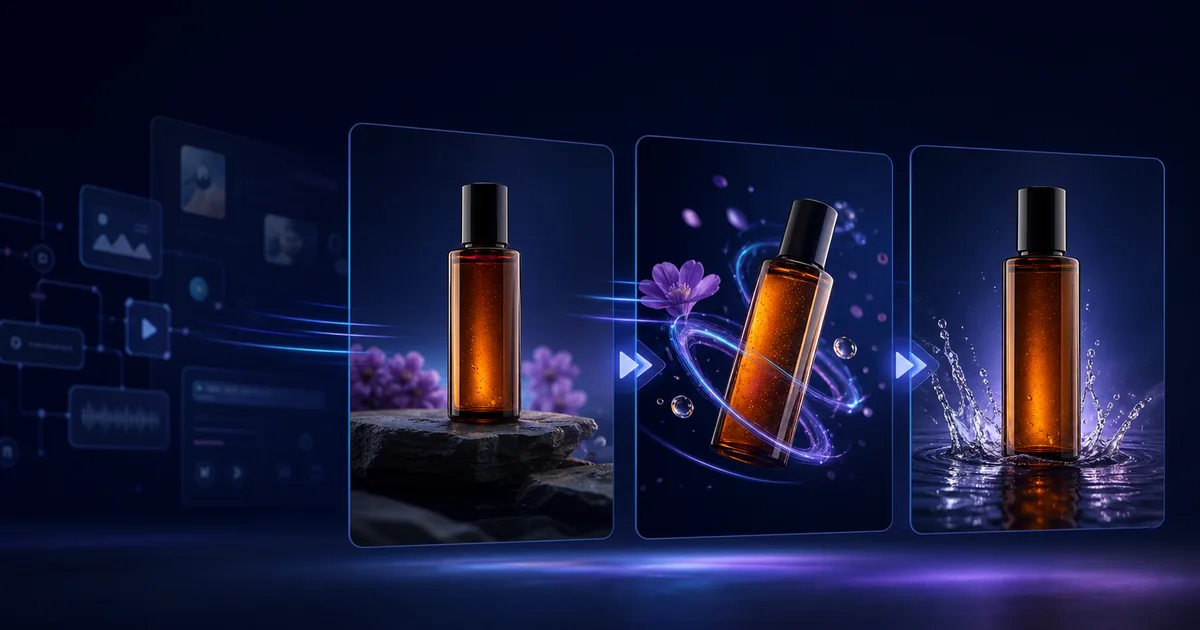

AI product video prompts need to describe what moves and what must remain fixed. Product drift happens when a prompt asks for dramatic motion but never tells the model that the packaging, label, logo, color, and proportions are non-negotiable.
The safest workflow starts with an approved product image, requests one restrained motion, and checks every generated frame against the source. A prompt can reduce ambiguity, but it cannot guarantee legal or brand accuracy.
Practical rule
Test one controlled variable, approve the useful result, and preserve that decision in the next stage.
Why AI Video Changes Packaging
Image-to-video models do not rotate a perfect 3D copy of your product. They predict new frames from the source image and prompt. Small lettering, reflective surfaces, occluded edges, and fast movement give the model room to reinterpret details.
- Rotation reveals unseen surfaces: the model must invent the back or side.
- Small text is fragile: labels may melt or change between frames.
- Reflections move: glossy packaging can appear to reshape as highlights shift.
- Hands create occlusion: fingers covering the product force the model to reconstruct hidden areas.
- Multiple camera moves conflict: orbit, zoom, and crane instructions create more geometry to solve.
For the source-image stage, use our realistic AI product photo checklist.
The Packaging-Consistency Prompt Formula
Fixed attributes: shape, dimensions, cap, logo position, label layout, colors, materials, and visible text remain unchanged.
Subject motion: [ONE SIMPLE ACTION OR “REMAINS STILL”].
Camera motion: [ONE CAMERA MOVE].
Environmental motion: [ONE SUBTLE BACKGROUND EFFECT].
Lighting: preserve direction, exposure, and product color.
Exclusions: no rotation beyond visible surfaces, morphing, new text, extra objects, hands, cuts, or redesign.
Use only the restrictions that match the shot. A concise, testable prompt is easier to refine than a wall of negative instructions.
Six Product Video Prompts to Copy
1. Slow commercial push-in
2. Subtle turntable
3. Floating product ad
4. Ingredient environment
5. Website hero loop
6. Vertical social reveal
Fix the Most Common Packaging Failures
| Failure | Likely cause | Next test |
|---|---|---|
| Label changes | Small generated text | Reduce motion and composite the approved label in editing |
| Bottle bends | Complex rotation or reflection | Lock the product and move the camera less |
| Logo disappears | Occlusion or changing angle | Keep the logo front-facing and unobstructed |
| Color shifts | Lighting or grading request | Lock white balance and state the approved color |
| New accessories appear | Broad lifestyle prompt | List allowed objects and exclude additions |
Run short tests before extensions or upscaling. The cost-per-usable-clip method helps measure which prompt and model combination actually saves money.
Product Video Review Checklist
- Compare first, middle, and final frames with the approved product photo.
- Read every visible label, logo, price, and claim at normal size.
- Check silhouette, cap, seams, proportions, and material reflections.
- Confirm the advertised product variant and color are correct.
- Verify that hands, ingredients, and effects do not intersect the package.
- Add critical copy in a conventional editor rather than generating it in-scene.
- Watch the export on the target mobile or desktop placement.
For a complete campaign workflow, continue with one product photo to a full AI ad.
How QuestStudio Helps
Use Image Lab to prepare the approved frame, save the prompt structure in Prompt Lab, and compare motion results in Video Lab. Keeping the source, prompt, and tests together makes it easier to identify which change improved consistency.
Create a free account for one controlled product test. Consider a plan after repeatable production or model comparison proves valuable for your catalog.
Frequently Asked Questions
Why does AI video change product labels?
Labels contain small structured text that models may reinterpret while predicting new frames, especially during rotation, occlusion, or fast motion.
Can a prompt guarantee packaging consistency?
No. A prompt reduces ambiguity, but every result still needs comparison with approved product assets.
What camera movement is safest for product videos?
A slow push-in or locked camera is usually safer than a wide orbit because less unseen product geometry must be invented.
Should I ask the product to rotate?
Use only a small rotation that reveals surfaces visible in the source. A full rotation forces the model to invent hidden packaging.
How should I handle label text?
Keep motion restrained and composite critical approved label text in editing when exact accuracy matters.
Should I upscale every test clip?
No. Test short low-cost versions first, then polish only the output that passes product review.
Final Takeaway
Complete the reader's job first, then use QuestStudio when organizing prompts and connecting media stages makes the process easier to repeat.
Create a free QuestStudio account for one real project, or compare plans after the workflow proves its value.
Related guides
Continue with a useful next step
 Image
ImageAI Product Catalog Consistency: A 100-SKU Workflow
Create consistent AI-assisted product images across 100 SKUs with a locked product specification, scene recipe, manifest, reference angles, acceptance criteria, and batch QA.
 Video
VideoAI Product Video Hands: Fix Grip, Contact and Scale
Fix AI product video hands by reviewing approach, contact, grip and release. Simplify motion, protect product scale and reject clips that change the item.
 Product Ads
Product Photo to UGC Ad Video Prompts
UGC-style ads work because they feel like real people sharing real results. Get 15 copy-paste prompt templates to turn product photos into UGC-style ad video variations for TikTok, Reels, and Shorts.
An opening package adds another continuity problem: its physical state changes. Use the AI unboxing state map to track the lid, insert, product, and accessory count across the reveal.