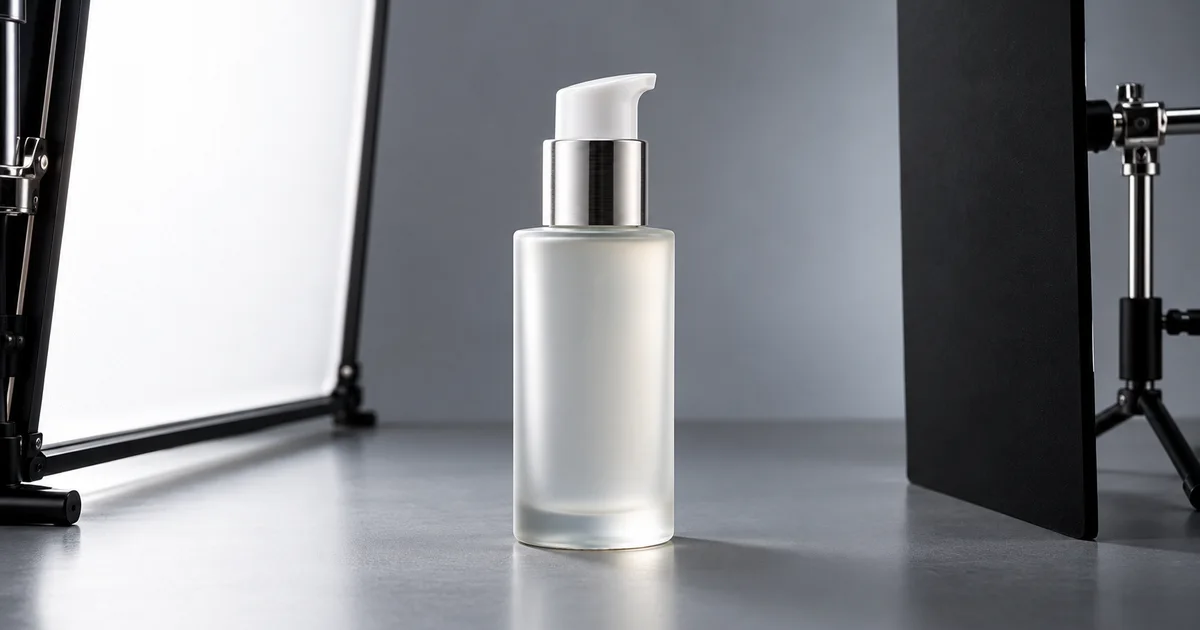

Beauty product photography starts with a readable package: a clear silhouette, an accurate finish, a visible label and reflections that describe the shape. Put one clean bottle or jar in soft light, control what it reflects, and approve a factual front view before building a styled scene.
This guide focuses on photographing beauty packaging, including frosted bottles, metallic collars, glossy tubes and jars. It uses a fictional pump bottle to explain a repeatable capture test. For lipstick color, applied texture or wear results, use real application photographs and the separate cosmetics shade and swatch workflow. A beautiful bottle photograph cannot prove what the formula does.
Download the packaging test log
Choose three deliverables before styling the set
Start with a front packshot, a label or mechanism detail, and one supporting scene. Each has a different job. The front identifies the item, the detail supplies information and the scene gives the package context. Add other views when the actual product requires them, rather than creating several nearly identical hero images.
Our fictional example is one frosted bottle with a white pump and a silver collar. The front artwork is a simple product name; the back carries the actual information a customer would need. There is no carton in the example order. We will use a plain gray capture surface and later consider a restrained vanity scene.
Write down the cap or pump state before shooting. A pump photographed extended in one frame and locked in another may look like a different package to an unfamiliar buyer. If both states are useful, name them in the shot record. Keep the same physical sample through the test, especially when older and newer packaging are similar.
| Deliverable | Must show | Does not establish |
|---|---|---|
| Front packshot | Whole bottle, pump state, front label, material finish | Formula performance or exact capacity |
| Information detail | Actual back label or a real mechanism detail | Text hidden around the other side |
| Supporting scene | The same package in a suitable setting | Ingredients, certifications or included accessories |
Photographer-led examples are useful here. Profoto's beauty-set tutorial separates a frontal view, an angled view and a composition, showing why a gallery needs more than one kind of image. Your equipment can differ; keep the job of each frame explicit.
Prepare the package before adjusting the camera
Inspect the bottle under the light you will use. Remove loose dust and fingerprints with a method appropriate to the packaging. Check that the cap is seated, the pump is aligned and the label belongs to the intended version. Handle the sample by an area outside the next photograph when possible so cleaning does not become a loop.
Do not treat every visible mark as something to erase. A permanent seam, molded code or part of the package construction may need to remain. A damaged sample intended for a new-product catalog might need replacement; a used item being sold in that condition needs an accurate record. Decide what the sample represents before retouching.
Prepare a plain background, a stable camera or phone support, a broad diffused light source, a white card and a black card. The cards do different things: white can fill a dark area or create a bright reflection; black can define an edge by reflecting as a dark strip. They are movable parts of the lighting setup, not fixed decorations.
Build a light setup you can change one piece at a time
Place the bottle upright and keep the camera approximately level with the area you need to read. A high camera position can make the shoulder prominent while shortening the visible front label. Begin with a broad diffused source to one side. With window light, avoid direct sun and turn off other lights that create a competing color or highlight.
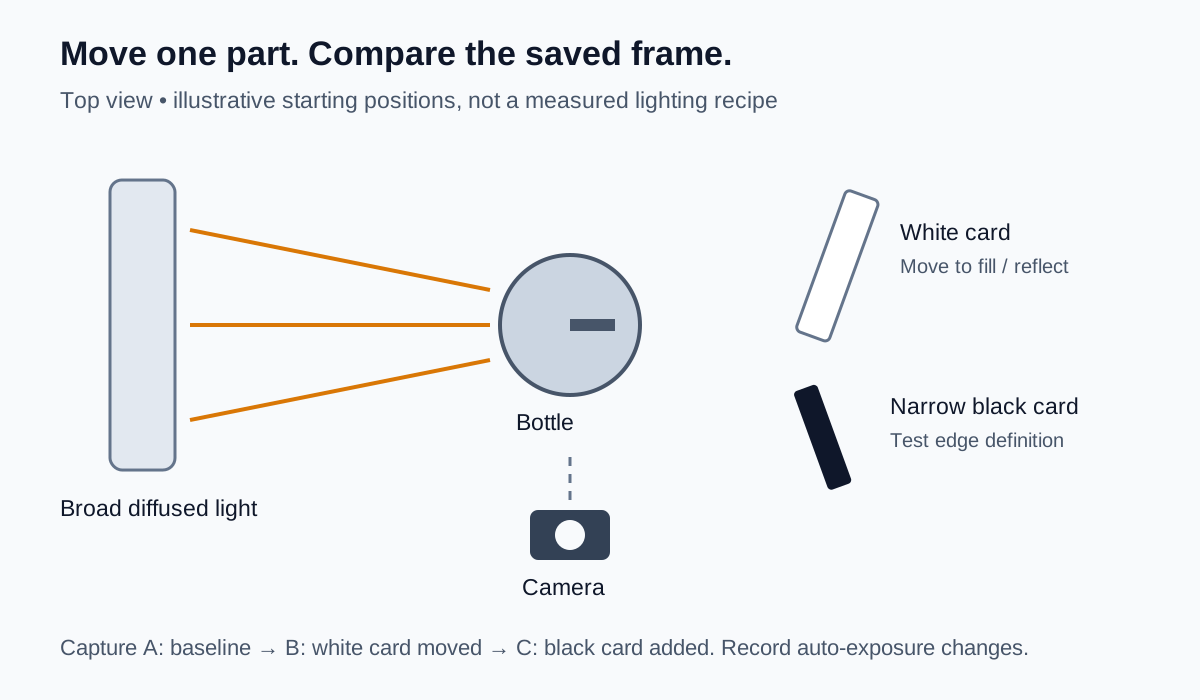
Take a baseline frame before adding the black card. Then move the white card and take a second frame. Finally, introduce a narrow black card near one side and take a third. Leave the camera, exposure and bottle position unchanged during this comparison whenever your equipment permits. Otherwise record any automatic exposure change so you do not attribute it to the card alone.
Compare the three files together. Can you see the shoulder and base? Has a broad reflection covered the name? Did the black card define the edge or turn half the bottle gray? The successful position is the one that makes this package understandable, not the one that matches a diagram exactly.
Record each change in the downloadable log. It contains fictional example decisions and blank rows for your own captures. Replace its sample filenames with yours; the listed outcomes are teaching examples, not test results.
Diagnose glare before reaching for retouching
A glossy package reflects its surroundings. Moving the light, the card or the package changes what the camera sees in that reflection. If a bright stripe hides the label, first move the source or card slightly and watch the stripe move. Do not immediately darken the entire image, which can make the rest of the package harder to see.
Keep some useful highlights. A silver collar without any tonal variation can look like gray plastic. A frosted bottle with an invented hard mirror reflection can look like a different material. The aim is a controlled highlight that describes the finish while leaving the important information legible.
| Visible problem | First experiment | Check afterward |
|---|---|---|
| White stripe across the name | Move the diffused source slightly to the side | Name reads without losing the bottle edge |
| White bottle disappears into the background | Introduce a narrow black card outside the frame | Edge becomes readable without a false dark coating |
| Dark tube looks featureless | Move a white card to make a broad reflection | Tube shape appears without covering the lettering |
| Metal looks dull after editing | Compare with the original highlight pattern | Restore material cues rather than adding arbitrary shine |
| Phone or room reflected in the collar | Adjust camera distance or the reflected surroundings | Front proportions and label remain usable |
Transparent packaging needs additional care because the old background may remain visible through the container. If you intend to change that environment later, read the transparent-product photography guide. A normal cutout does not automatically separate transmitted light from the glass itself.
Capture the label as information, not decoration
Once the front is clear, photograph the actual back or side label separately. Keep its useful text plane close to parallel with the camera where possible. A curved bottle may require more than one view; forcing all the text into a single distorted frame makes it harder to read.
Check focus at full size. If only the pump is sharp, move the focus point to the label and test again. If you are too close for the camera to focus reliably, move back. Do not ask a generator or an aggressive enhancement pass to reconstruct unreadable ingredient text, quantities or directions.
Use the approved packaging and product information as the reference when checking typography. A word that looks plausible is not necessarily the right word. If the source is unreadable, reshoot it. Any separately designed information graphic should use verified copy and be identified as a graphic, rather than masquerading as a photograph of a label.
Keep the back-label image associated with the same package version as the front. A mixed pair can be misleading even when both images are individually sharp. The test log includes a version field to make that check visible.
Style the supporting frame after the packshot passes
Move into a simple secondary scene only after you have a usable factual set. For the example bottle, a neutral vanity surface and folded towel may be enough. Keep the package the largest visual subject and leave room for the final crop. Avoid adding several other bottles that could look like a set included in the order.
Consider what a prop implies. Fruit, leaves, laboratory glassware and water droplets can suggest ingredients, testing or a product property. Choose styling from the approved brief instead of adding those objects simply because they are common in beauty advertising. A scene should support the actual product story.
Photograph the same bottle in the scene when practical. If you use a generated environment, retain the factual source and review how the package relates to it. A bottle resting on stone needs a believable contact area; a tilted pump must not become upright merely because that composition looks neater.
Approve the three exports together
Put the front, detail and supporting frame beside one another. They should depict the same package version, pump state where relevant, label, proportions and material finish. Then inspect each at its actual delivery size. A perfect-looking master does not help if resizing makes the small text illegible or a mobile crop removes the dispenser.
For our fictional review, imagine that the first front image has a reflection across the name. Mark it “reshoot: move card,” not “approved.” A second frame has a readable name and intact edges, so it can move to export review. If the styled version gains a gold collar, reject it despite the attractive background: the sample has a silver collar.
For color-sensitive work, keep the capture and export process consistent and compare against the physical reference under appropriate viewing conditions. The product photo color-correction workflow covers that stage. A neutral reference can help diagnose a shift, but checking two phones cannot prove universal color accuracy.
Save the accepted filenames, package version and remaining corrections. Follow the destination's current size and background requirements when exporting. The three-shot plan describes image jobs; it does not impose one universal marketplace specification.
How QuestStudio helps
Use Image Lab to explore a supporting packaging scene once your source is readable. Select a model that accepts the required image reference, review its available controls and credit requirement, and try one restrained background direction. The first task is a concept you can compare, not a whole catalog.
Check the result against the source for pump geometry, collar finish, silhouette, label and contact shadow. Generative editing can redraw these details even when the instruction asks it to preserve them. If exact packaging must remain unchanged, use the concept as a backdrop reference and finish with approved product pixels in a suitable compositing editor. Keep real label and application photographs as the evidence.
Frequently asked questions
Can I photograph beauty products with a phone?
Yes. Use stable support, a readable label plane, soft light and movable reflection cards. Inspect focus and glare in the saved file before making the full set.
How do I remove glare from a cosmetic bottle?
First change what the bottle reflects by moving the light or a card. Keep useful highlights that describe the material and reshoot when glare hides information.
Should the packaging background always be white?
Use the current requirements of the destination for its main image. Neutral backgrounds make review easier; supporting brand scenes can use other surfaces when they represent the product clearly.
Can AI repair unreadable label text?
Do not rely on generated lettering as product information. Capture a sharper label photograph or create a clearly identified information graphic using verified copy.
Is a packaging photo enough to show a makeup shade?
No. Packaging and applied shade answer different questions. Use actual product and application photographs when customers need to assess color, texture or finish.
Finish one package before scaling the collection
Keep the accepted lighting setup and the rejected frames with their reasons. The next bottle then starts with a useful reference, while its own material and label still receive a fresh check. Three clear images that agree with each other are a better foundation than many scenes that describe different products.
Hero: AI-generated editorial illustration. Diagrams and worksheet examples are original fictional teaching aids, not measured product or model tests. Prepared October 25, 2026.