
This guide turns a current search question into a repeatable production decision. It focuses on the source, controls, review, and destination checks that determine whether an output is actually useful.
Why “video to video AI” is the stronger search intent
Current Trends interest for “video to video AI” is materially higher than the broader “AI video editor” phrase. The intent is also clearer: a creator already has footage and wants to transform it. Ranking pages and Runway's current Aleph guidance show compelling background, wardrobe, lighting, object, and style changes using direct action verbs.
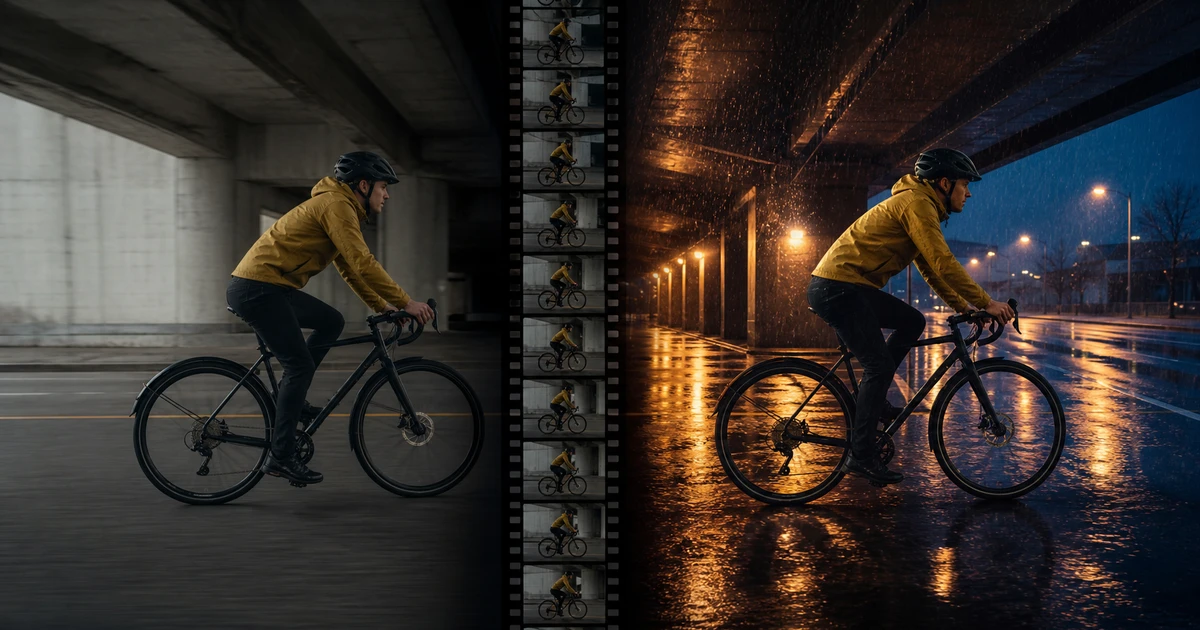
The weak point is temporal approval. A beautiful still frame does not prove the edit works over time. The bicycle may change across frames, rain may pass through the rider, the face may drift during a turn, or a replacement object may slide. This workflow treats motion preservation as a first-class requirement.
Qualify the source clip before uploading
Use one shot with a clear subject, readable action, stable exposure, and enough resolution to inspect. Avoid cuts, dissolves, heavy compression, subtitles, watermarks, overlapping people, extreme motion blur, and objects that repeatedly leave and re-enter frame. Trim to the shortest section that contains the complete action.
| Source property | Good candidate | Risky candidate |
|---|---|---|
| Action | One cyclist crosses frame | Montage with several events |
| Camera | Locked or one smooth move | Whip pans and cuts |
| Visibility | Subject remains readable | Frequent occlusion and blur |
| Lighting | Consistent source exposure | Clipped highlights or pumping |
| Truth | Authorized face and product references | Unverified logos or identities |
Video-to-video generation cannot restore information the source never captured. If the face or product is unreadable in the original, use another take.
Write a change-and-preserve contract
Runway's current Aleph guidance recommends a direct action verb plus the desired transformation. Add preservation only for facts the edit cannot sacrifice. Do not bury the core change under conversational explanation.
Weak: Make this cinematic and rainy but keep everything the same.
Controlled: “Change the dry concrete underpass into the same location during blue-hour rain. Preserve the cyclist's identity, mustard jacket, black helmet, bicycle geometry, pedaling motion, speed, screen direction, camera position, framing, and shot timing. Add physically consistent rain, wet asphalt reflections, cool ambient sky, and warm existing practical lights. The rider and bicycle remain dry enough to retain clean edges during this test. Keep one continuous shot with the original first and last frame composition.”
Use a change mask in plain language
Separate the frame into change zones and preserve zones. For a background replacement, the environment changes while subject, foreground interaction, camera, and action remain locked. For wardrobe, the garment changes while body, face, pose, hands, and environment remain locked. For relighting, illumination changes while geometry and color identity remain believable.
If the workflow accepts a keyframe or reference, assign it one role. A color keyframe can guide the desired environment; it should not replace the source performer. Current product versions vary, so rely on the controls visible in the tool you are using rather than assuming every capability in a newer model guide is available.
Generate short tests and review three ways
- Normal-speed review: Does the transformation support the story without attracting attention to defects?
- Half-speed review: Do identity, objects, rain, shadows, and edges remain stable through motion?
- Frame review: Check the first, last, occlusion, fastest movement, closest face, and contact frames.
Listen to the source audio separately if it will be retained. A visual transformation may not justify changed dialogue, ambience, or synchronized effects. Keep the original audio master until the picture edit passes.
Diagnose temporal failures
Identity changes during a turn
Use a shorter source, reduce the change scope, improve visibility, and strengthen the authorized identity reference.
Object geometry pulses
Lock the object description and test a clip with less occlusion or motion blur.
Background slides
Restate camera behavior, depth, horizon, and scene geometry; reject the shot if parallax remains impossible.
Rain or fire ignores contact
Specify interaction with surfaces and light, then inspect contact and reflection frame by frame.
Style overwhelms truth
Reduce style scope and preserve products, faces, text, and materials explicitly.
Good middle, broken ends
Trim to usable handles or regenerate with explicit start and end composition.
Compare versions fairly
Review the same time range at matched playback size and audio level. Record the source, prompt, references, model version, output, failed frame, and changed variable. A/B labels should hide which version is newer when a reviewer can judge without that context.
Track approved seconds per attempt and revision time per approved shot. Video-to-video can save a reshoot only when the transformed footage survives the edit and destination. A low generation price does not matter if ten unstable versions produce zero usable seconds.
Example: transform a product testimonial
A five-second testimonial cutaway shows an authorized customer holding the real package in a plain office. The campaign needs a warmer evening environment, but the spoken claim, hand position, package geometry, and camera move must remain true. Start by transforming only the background light and window view. Do not change clothing, package, or facial expression in the same pass.
Review the label and fingers on every contact frame, then compare lip movement to the original audio. If the package pulses or speech sync slips, reject the shot rather than hiding it under captions. Once picture passes, place the original authorized audio back under the transformed image and complete normal color, sound, legal-claim, and export review.
Final video-to-video approval
- The source footage, identity, product, style inputs, and intended use are authorized.
- The requested transformation is visible and supports the shot's story job.
- Identity, motion, camera, timing, geography, and factual locks remain stable.
- Lighting, shadows, reflections, contact, and perspective behave over time.
- The first, last, fastest, closest, and occluded frames pass inspection.
- Original or replacement audio is synchronized, intelligible, and authorized.
- The destination crop, compression, and final export were reviewed.
- Source-to-output lineage and approval are recorded.
QuestStudio exposes Runway Gen-4 Aleph for video-to-video transformation. Runway's current Aleph prompting guide is the primary reference for its latest prompt patterns; verify which controls are present in the model version you actually run.
For a targeted subject replacement, the PixVerse Swap workflow adds a reference-matching and occlusion checklist for hands, shadows, and reflections.
Frequently asked questions
What is video-to-video AI?
It transforms existing footage using a prompt or reference while using the source motion, framing, and timing as structure.
What makes a good source clip?
Use one short shot with a clear subject, one action, stable exposure, readable detail, and minimal occlusion or compression.
How should I write the prompt?
Use a direct action and desired transformation, then name only the identity, motion, camera, timing, and truth facts that must be preserved.
How do I check temporal consistency?
Review at normal speed, half speed, and frame by frame at the start, end, fastest movement, closest detail, and occlusions.
Can video-to-video replace normal editing?
It can transform shot content, but selection, timing, sound, captions, claims, and final export still require an editing workflow.
For a character replacement built around a recorded actor, review a Ray3 Modify performance through contact and timing.