

A useful ChatGPT family photo prompt names every person, protects the original arrangement and asks for one specific change. A cleaner background is not a successful edit if someone's glasses, smile or clothing changes with it. Start with a clear group photo and compare every person before keeping the result.
Choose the job first. Removing a distraction from an existing photo is a cleanup. Bringing relatives together from separate references is a composite. Describing a family without supplying their photos creates fictional people. These need different prompts and different approval decisions.
See the four-person cleanup example or adapt the family cleanup template.
Worked example: remove one object without restyling the family
We generated one fictional four-person family source and two independent edits with the built-in Codex image tool on October 23, 2026. Both edits started from the original. The tool did not expose a model identifier. This is a review exercise, not a separate ChatGPT app test, a biometric comparison or a test of all ten templates below.
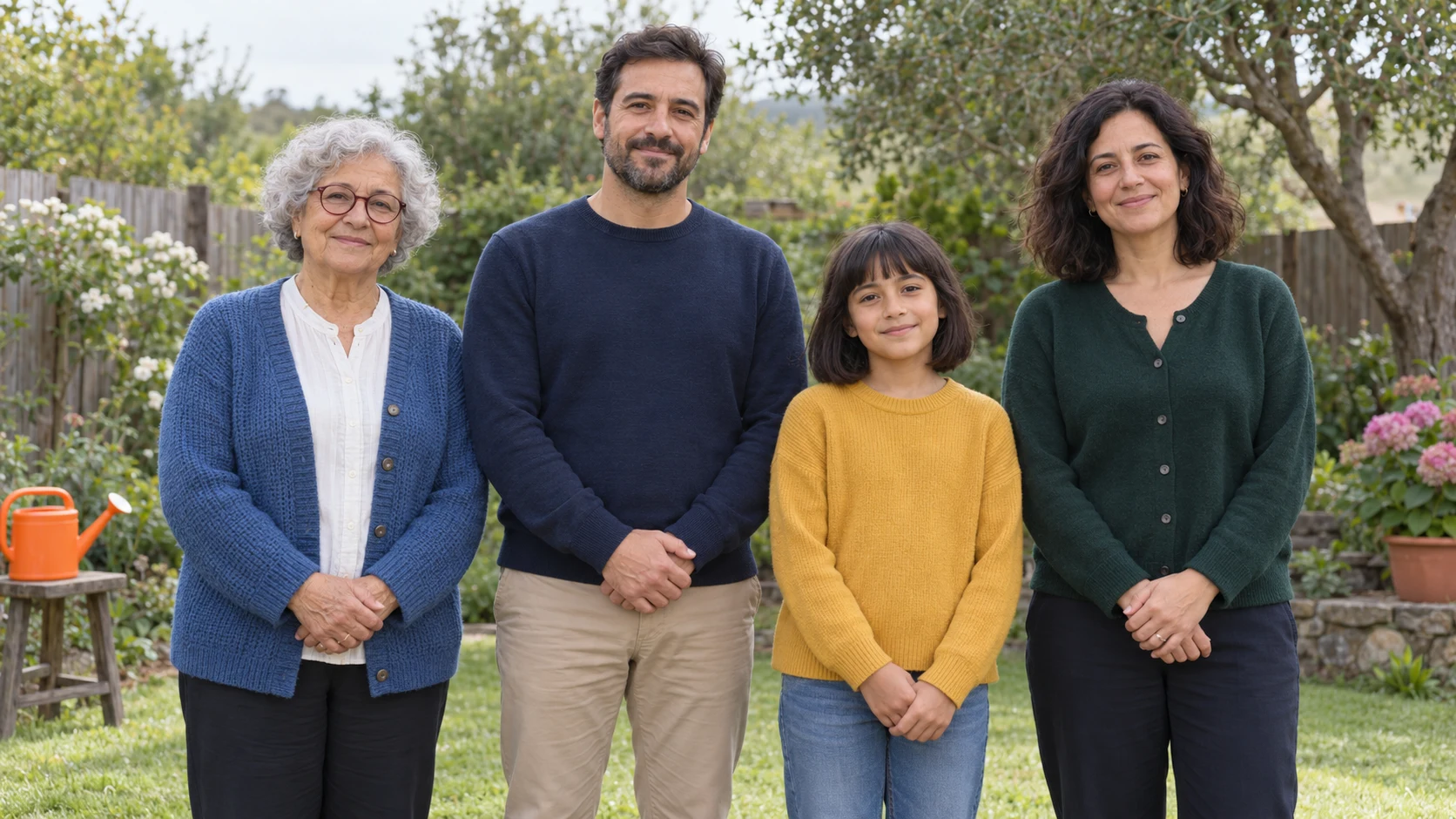
Make a person map before editing
Use positions and visible traits, not guessed names or relationships. The labels are instructions for matching people; they are not text to add to the image. For two rows, add front/back and each row's left-to-right order. Do not use an AI guess about a person's age or relationship as a family record.
| Person | Visible anchors | Check after the edit |
|---|---|---|
| 1, far left | Silver curls, burgundy glasses, blue cardigan | Glasses shape, expression, cardigan buttons and clasped hands |
| 2, center-left | Short dark hair, beard, navy sweater | Beard edge, sweater neckline and hands |
| 3, center-right | Dark bob and bangs, mustard sweater | Hair outline, expression, sleeve cuffs and hand position |
| 4, far right | Wavy dark hair, green cardigan | Hair shape, neckline, button layout and hands |
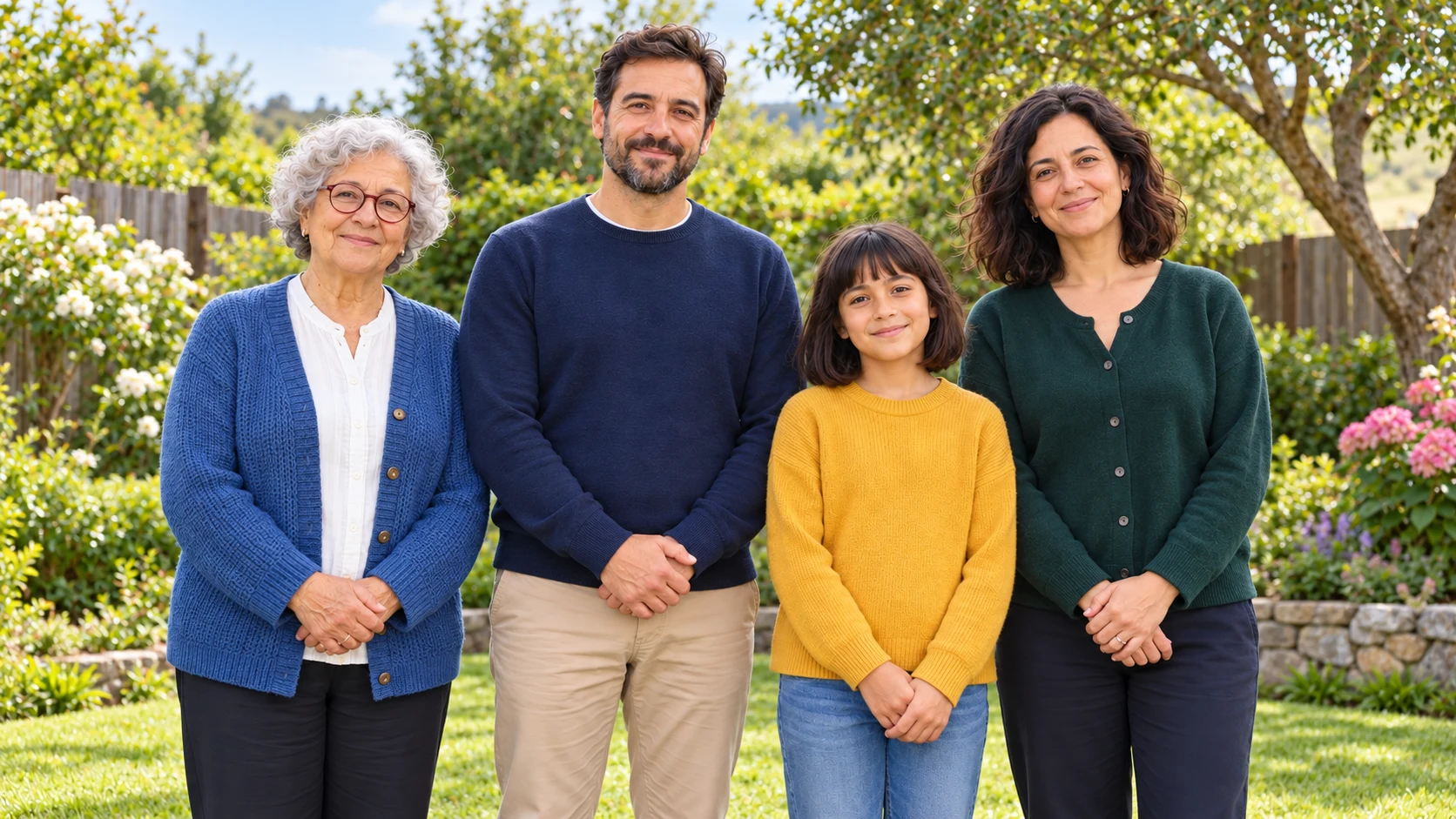
The first instruction asked for brighter faces, smoother skin, stronger smiles, improved clothes and a tidier garden. It gave the tool permission to change much more than the intended object. Rejecting that result for this cleanup job is a correction to our brief, not proof that the model disobeyed it.
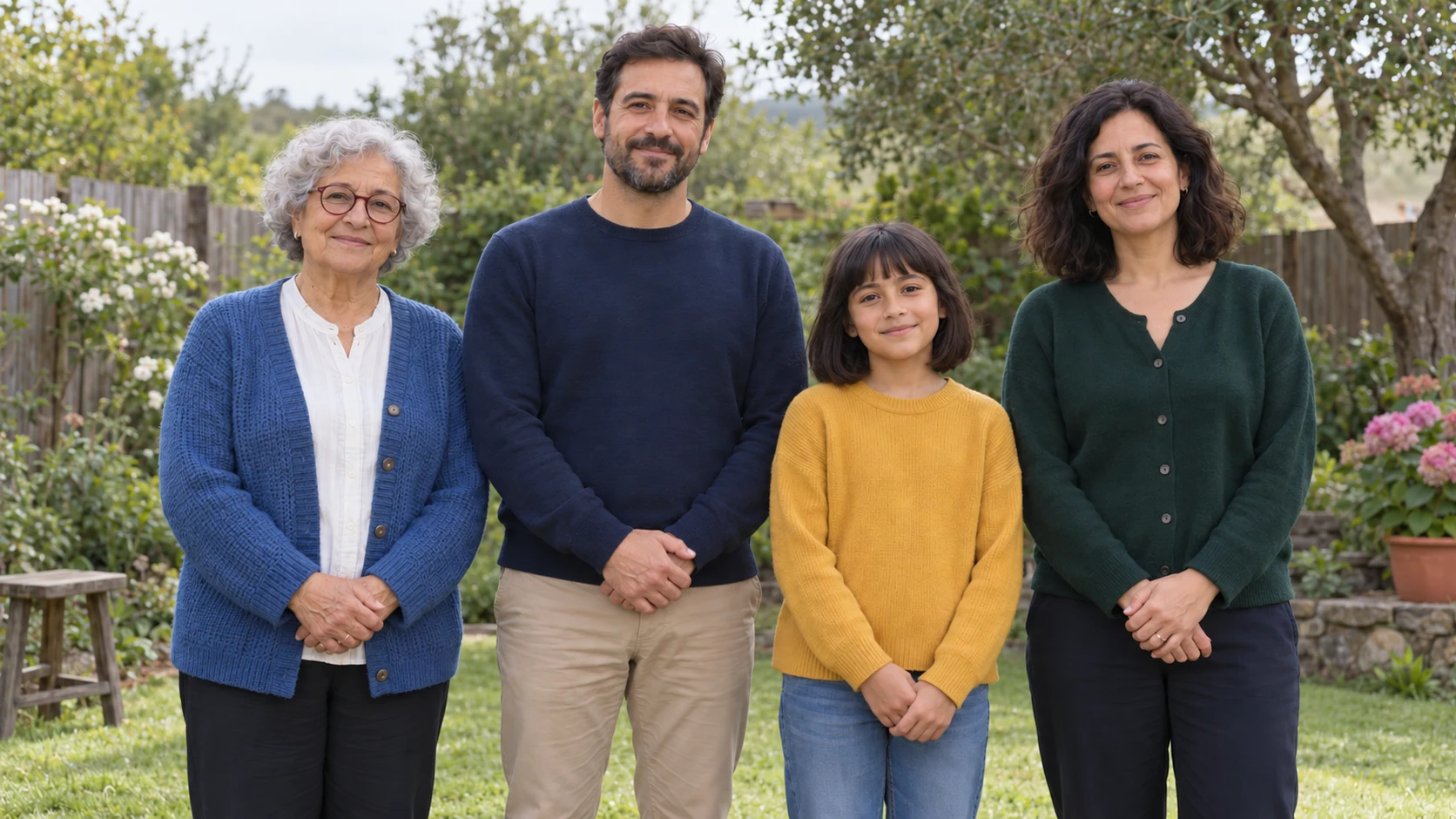
For the second attempt we returned to the untouched source, named all four positions and limited the change to the can. The main background goal is met, and the unnecessary white neckline does not appear. Fine hair, facial and knitted-fabric detail still differs, so this is a closer review candidate, not an unchanged-pixels claim. Neither output has been approved by a real family.
Show the broad instruction and why we rejected it
Improve this uploaded fictional family portrait for a polished family album. Remove the orange watering can at the far left, make the garden tidier, brighten the faces, smooth distracting skin texture, make everyone smile more naturally, and improve the clothing and composition. Preserve all four people and keep the photo realistic. Return one horizontal 16:9 photo, not a collage or comparison.
Too many allowed changes for an object-removal job. The result changed the scene and wardrobe beyond what the job needed.
Show the exact narrower instruction used for the restart
Edit this uploaded fictional family photo with ONE allowed change: remove only the bright orange watering can from the stool at the far viewer-left. Leave the stool present and reconstruct only the small background area occupied by the can. Keep the same horizontal 16:9 composition, framing, lighting, colors and garden scene. There are exactly four people, in this left-to-right order: Person 1 silver curls, burgundy glasses and blue cardigan; Person 2 short dark hair, beard and navy sweater; Person 3 dark bob with bangs and mustard sweater; Person 4 wavy dark hair and green cardigan. Keep each person's visible face shape, apparent age, hairstyle, expression, glasses, skin texture, clothes, button layout, hand position, body proportions and place in the group unchanged. Do not brighten faces, smooth skin, change smiles, add an undershirt, alter clothing, move anyone, remove the stool, or tidy other garden areas. If the can cannot be removed without changing a person, keep that person unchanged. Return one complete photo, not a collage.
Show how the fictional source was created
Create an original photorealistic fictional family snapshot for a careful photo-editing tutorial. Exactly FOUR people, no one else, arranged in one readable row outdoors in a quiet green garden, framed from mid-thigh up. Viewer-left to right: (1) a grandmother around 70 with short silver curls, round burgundy glasses, a blue knitted cardigan over a white blouse and a relaxed closed-mouth smile; (2) her adult son around 40 with short dark hair, a short neat beard, navy crewneck sweater and beige trousers, gentle closed-mouth smile; (3) a child about 10 with a chin-length dark bob and straight bangs, mustard-yellow long-sleeved sweater and ordinary blue jeans, calm closed-mouth smile, standing slightly forward but not covering any adult face; (4) an adult woman around 38 with shoulder-length wavy dark hair, forest-green buttoned cardigan and dark trousers, closed-mouth smile. All have medium warm skin tones, ordinary natural facial texture, distinct features, age-appropriate everyday clothing, no glamor styling. Each person's hands rest visibly in front of their own body, not crossing another person. Faces all toward camera and unobstructed. Gentle overcast daylight, realistic phone-photo color and some soft garden detail. A single bright orange plastic watering can sits on a low garden stool at the far viewer-left edge, separated from the grandmother by a clear gap; this will be the removable background distraction. Keep the stool, a simple fence and greenery readable. Wide horizontal 16:9 canvas, generous headroom and side margins. No text, labels, logos, collage or arrows. This is a fictional source image, not a real family.
Decision: reject the broad version for this task; keep the narrower version only as a candidate for individual review. If any person's features remain unacceptable, stop regenerating the group and use a conventional editor to repair the small background area while leaving the people untouched.
Download the completed example and blank person-by-person review. Mark a hidden or unclear detail as not verifiable, rather than treating it as a pass. A good result for the central person does not compensate for a changed face at the edge.
Before you copy a prompt
Use a source with every face visible, without heavy filters or a face hidden behind another person. For real family photos, get agreement on the edit and where it will be shared. Keep children in ordinary age-appropriate clothing and preserve their appearance rather than applying adult styling. Use only references you are authorized to upload.
For a multigeneration composite, supply a clear reference for each person and a position map, using a model that supports the required number of inputs. A blurry face or a missing relative cannot be recovered from a description. Label a newly assembled portrait as a composite when the family did not actually pose together. Keep animating an old family photograph as a separate project after approving the still.
ChatGPT Group Photo Prompts: copy-ready templates
Replace bracketed variables, remove conflicting instructions and choose a model or mode that accepts your references. These ten templates are starting briefs, not ten tested outcomes. The worked example above records the only two editing attempts shown here. Preservation clauses express your requirements; inspect the result to decide whether they were met.
1. Family portrait cleanup
Review: This adaptable template differs from the exact four-person experiment instruction. Fill the person map, choose the source aspect ratio in the model controls and compare every person before accepting the edit.
2. Team headshot composite
Review: Confirm which input belongs to each team member. A newly assembled team image is a composite; review each face and keep its source reference.
3. Wedding group portrait
Review: Inspect each guest and wedding detail. If only exposure needs correction, an ordinary tonal adjustment can avoid regenerating people.
4. Friends travel photo
Review: Keep the trip location and event intact. Reject a cleaner-looking version that invents landmark details or changes anyone in the group.
5. Graduation group
Review: Read every visible cord, stole and school mark against the source. Do not treat plausible new detail as a real award.
6. Company event photo
Review: Inspect badges and signage at full size. Apply exact lettering separately when required, and keep the original event record.
7. Sports team portrait
Review: Check every athlete once, including jersey numbers and hand ownership. A repeated face or number is a reason to revise the composite.
8. Birthday group photo
Review: Keep real guests, candle count and decorations fixed. For a separate styled portrait, use the birthday-photo workflow.
9. Multi-generation portrait
Review: Check older adults and children separately for unintended age changes. Use known mobility and position requirements; do not infer them from appearance.
10. Add one missing person
Review: Confirm the selected model accepts both references. Compare existing people as well as the inserted person, and label the output as a composite.
A reliable five-step workflow
- 1Number people before editing
Write Person 1 from the left, Person 2, and so on. Refer to one person by label instead of vague phrases such as the woman in back.
- 2Separate correction from invention
Exposure, crop, and clutter cleanup are edits. Adding a missing person or creating a new arrangement is a composite and should be reviewed more strictly.
- 3Change one region at a time
Fix the background before faces, or one person before another. Large instructions invite the model to redraw areas that were already correct.
- 4Review at face level
Zoom into every face, every visible hand, uniform number, piece of jewelry, and repeated pattern. A group can look convincing from far away while one person is wrong.
- 5Keep the untouched original
Export the edited version separately and retain the source, especially for weddings, graduations, journalism, or family archives.
Fix the most common failures
Two people share one face
Re-run with numbered labels and one identity reference per person. Reduce the number of people changed in a single pass.
Hands merge between people
Increase spacing, simplify overlapping poses, and ask for hands to remain visible and separate.
The wrong person was edited
Name the person by left-to-right number, clothing, and position, then request only one localized edit.
The group looks staged and unnatural
Preserve the original expressions and body language. Avoid asking every person to smile or face the camera identically.
When a result fails, record the person and detail that changed. Restart from the approved original rather than repeatedly editing a face that has already drifted. One smaller request can make the next review easier, but stop if the tool keeps changing details you need to preserve.
How QuestStudio helps
Use Image Lab with a reference-capable model for one controlled edit. The template links carry the instruction into the Lab and request a source photo. Check the selected model's input support and choose a format that matches your photo before generating. A prompt does not enable masking or multiple references when that mode does not support them.
Keep the source, candidate and review notes as separate files. Compare at full size, then ask the people familiar with each subject to approve the result. For a two-person edit, the couple-photo review workflow gives a smaller version of the same check.
Final approval checklist
- Every person is present exactly once
- Each face matches the correct reference
- Hands and limbs remain separate and plausible
- Clothing, numbers, jewelry, and event details are unchanged
- Spacing and relative height look believable
Run this checklist against the actual destination. A thumbnail, marketplace listing, wedding album, campaign, and vertical reel all reveal different errors. Approval should describe why the asset passed, not merely that it looks good.
Frequently asked questions
How do I write a ChatGPT family photo prompt?
Name the exact people and their positions, state what must stay unchanged and request one specific edit. Attach a clear group photo, choose a supported reference-editing mode and review every person afterward.
Can ChatGPT add someone to a group photo?
It can attempt a composite when the chosen workflow accepts the needed references. Check the inserted person and everyone already in the photo for changes in features, scale, lighting and hands. Keep the original and describe the new image as a composite.
Why do group faces change even when the prompt says to preserve them?
A generated edit can redraw details beyond the requested object or region. Clear references and smaller requests help define the task but do not guarantee unchanged faces. Compare every person with the original.
How should I check a multigeneration family photo?
Review each person separately for facial features, apparent age, glasses, hair, expression and clothing. Check children and older adults for unwanted restyling. Do not infer missing features or family relationships from a generated result.
What should I do if the narrower prompt still changes someone?
Return to the original and stop using the changed face as a reference. For a small background repair, consider a conventional editor that lets you leave the people untouched. Do not accept the whole group because most faces look plausible.
Use the prompt as a brief, not a magic phrase
Choose one real output, use the cleanest reference you control, and make one change at a time. Keep the best prompt beside the approved result and record why rejected versions failed. That small discipline improves the next project more than adding another stack of style words.
Open Image Lab when you are ready to test the workflow.
Continue with a useful next step
 Image
ImageFix AI Hands: Repair Fingers Without Losing the Pose
Repair extra fingers, fused hands, and broken grips in AI photos. Check the pose, wrist, and object contact before masking and approving your next local edit.
 Image
ImageAI Full-Body Photos: Stop Cropping Heads and Feet
Stop AI portraits from cutting off heads and feet. Separate source framing from display crops, plan the full pose, and check margins before generating again.
 Image
ImageNegative Prompts for AI Images: Portraits, Hands & More
Copy negative prompts for realistic portraits, hands, and products. Troubleshoot face distortion, check model support, and compare one change at a time.