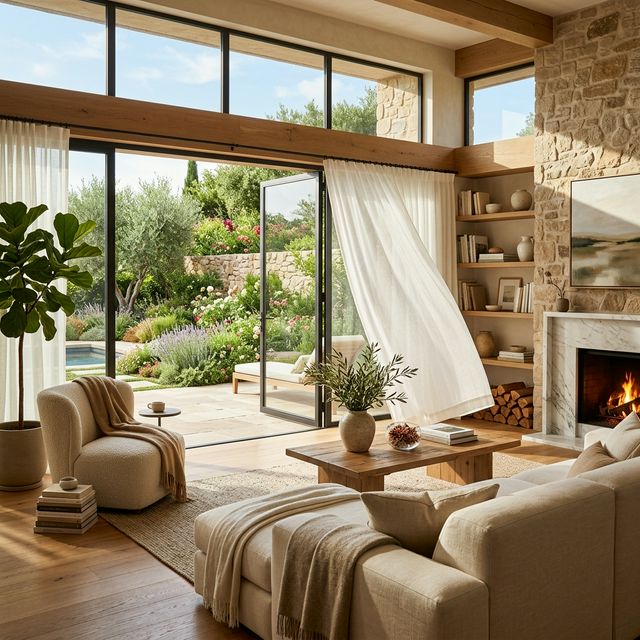

In image-to-video workflows, the image already defines the composition, lighting, and subject of the scene. Your prompt works best when it clearly directs motion, camera movement, and what should happen over time. That is the pattern current Runway and Google guidance both reinforce for image-to-video prompting.
The goal is not to force dramatic action into a still property image. The goal is to create calm, believable movement that helps buyers feel the space. For real estate, that usually means slow walkthrough energy, gentle camera motion, clean lighting changes, and subtle environmental detail instead of flashy cinematic chaos. Current prompt guides from Runway specifically call out camera terms like dolly, pan, locked, and focus shifts, which makes them especially useful for interiors and property visuals.
What makes a good real estate image-to-video prompt?
A good real estate prompt does four things:
Google's Veo best-practices guide emphasizes clear, specific prompts because ambiguity reduces output quality, and Runway's image-to-video guide says the prompt should describe the motion, camera work, and temporal progression rather than re-describing the still image. That is exactly the mindset that works best for real estate clips.
The best prompt formula for real estate photos
Use this simple structure:
Example:
This works because it keeps the camera behavior simple and the environment believable. Current Runway and Veo guidance both favor direct motion language over overloaded prompts full of vague adjectives.
What kind of camera moves work best for real estate?
The safest and most useful camera moves for property content are:
- slow dolly in
- slow dolly forward
- gentle pan left or right
- locked wide shot with subtle environmental motion
- smooth push in toward a focal area
- soft slider-style lateral move
Runway's current prompting guides explicitly recognize dolly, pan, locked, and focus shifts as promptable camera motion types, while Google's Veo guide also demonstrates that specific camera directions produce stronger results than generic cinematic language.
For interiors, simpler is usually better. A dramatic orbit or aggressive handheld move might look interesting in a music video, but in property marketing it often makes the room feel less believable and increases the chance of warped walls, shifting furniture, or unstable geometry. Runway's image-to-video guidance makes clear that motion should be intentionally directed, not overloaded.
What to avoid in real estate prompts
Avoid prompt choices that make the space feel fake or unstable:
| Avoid | Why |
|---|---|
| Fast camera moves | Breaks the calm, listing-ready feel |
| Multiple camera moves in one short clip | Conflicting instructions and unstable geometry |
| Heavy particle effects | Reads as stylized, not architectural |
| Dramatic subject motion in an empty room | Furniture and walls are more likely to drift |
| Large lighting swings | Fights the source photo and feels less trustworthy |
| Words like epic, surreal, explosive, dreamlike | Fine for art, weak for listing-ready realism |
For real estate, realism is usually the point. Google's best-practices guidance for Veo recommends being clear and specific, which generally means describing the actual shot you want instead of using broad aesthetic buzzwords.
Best prompt types for interiors
1. Walkthrough-style living room prompt
Why it works: it creates forward movement without asking the room to change shape or the furniture to move unnaturally. That aligns with the image-to-video principle that the image handles the scene while the prompt guides motion.
2. Kitchen b-roll prompt
Why it works: it gives the viewer a smooth scan of the space without forcing a fake walkthrough path.
3. Bedroom mood prompt
Why it works: bedroom shots often benefit from subtle motion and mood rather than wide dynamic movement.
4. Bathroom detail shot prompt
Why it works: this turns a still detail area into a premium-looking cutaway shot.
5. Home office prompt
Why it works: a side move often preserves structural stability better than a complex forward move in tighter spaces.
Best prompt types for exteriors
1. Front exterior hero shot
2. Backyard lifestyle shot
3. Balcony or view shot
4. Drive-up approach shot
These work well because exteriors often handle slight environmental motion better than cramped interiors, especially with trees, water, curtains, or clouds adding natural movement. Runway's camera-term guidance and Google's camera-shot examples both support this kind of specific shot language.
Copy-ready real estate walkthrough prompts
Here are plug-and-play prompts you can use right away.
Living room
Kitchen
Dining room
Bedroom
Bathroom
Home office
Exterior
Backyard
How to make real estate prompts look more expensive
If you want the clip to feel premium without becoming fake, focus on these details:
- soft natural light
- smooth controlled camera movement
- uncluttered rooms
- small environmental motion
- premium but believable language like polished, inviting, airy, warm, refined
Avoid pushing motion too hard. Current image-to-video guidance from Runway says the uploaded image is already defining composition and style, so your prompt should concentrate on controlled motion and temporal progression. That is exactly what premium real estate clips need.
Best practices for real estate source photos
The photo matters more than people think. The best image-to-video results for real estate usually start with:
- straight lines and clean composition
- bright but natural lighting
- minimal clutter
- sharp focus
- a clear main viewing angle
- no obvious lens distortion
If the source image already looks warped, dim, messy, or low resolution, the video result is more likely to feel unstable. Runway's guidance that the source image defines core scene structure is especially important for interiors where walls, windows, cabinets, and furniture need to stay consistent.
Real estate b-roll ideas beyond the main walkthrough
Not every clip needs to feel like a full walkthrough. Some of the best real estate content is short b-roll that can be cut together:
- slow kitchen pan
- bathroom vanity push-in
- detail shot of pendant lights or fixtures
- exterior entrance approach
- balcony skyline shot
- pool or patio atmosphere shot
- fireplace detail shot
- bedroom curtain-and-light shot
These smaller, contained prompts are often easier to generate cleanly because they ask the model to do less.
How QuestStudio helps
QuestStudio is a good fit for this workflow because real estate content often needs multiple variations from the same property image. You may want one living room walkthrough, one kitchen b-roll clip, one exterior hero shot, and a few detail scenes without rebuilding your prompt logic each time.
With QuestStudio, you can compare outputs across video models side by side, which is useful because some models handle interiors, reflective surfaces, and architecture more cleanly than others. You can also save prompt structures in Prompt Lab and the prompt library inside the app, so once you find a walkthrough formula that works, you can reuse it across future listings.
If you need to prep visuals before animation, image to image AI, background remover, image upscaler, and photo restorer can help clean the source image. For the motion step itself, image to video AI and AI video generator are the natural next steps.
Related guides
FAQ
What is the best prompt for turning a real estate photo into a video?
Should real estate image-to-video prompts use walkthrough language or b-roll language?
What camera moves are best for real estate AI video?
Why do real estate AI videos sometimes warp walls and furniture?
How do I make a property video look more luxury?
Final thoughts
The best real estate photo to walkthrough video prompts are not complicated. They are calm, clear, and built around believable motion.
Start with a strong property image, use one simple camera move, add just a little environmental life, and keep the tone polished. That gives you a much better chance of getting video that feels like real estate marketing instead of generic AI motion.
If you want a structured way to generate, compare, and save those prompt formulas, try QuestStudio and build a repeatable workflow for real estate visuals.